Here's a closer look at the shell input history scene in the sci-fi movie 'Tron: Legacy'.
Nitpicking the shell history scene in 'Tron: Legacy'
https://www.chiark.greenend.org.uk/~sgtatham/quasiblog/tron-legacy/
'Tron: Legacy' is a science fiction action film released in 2010, and is a sequel to '
Tron: Legacy Blu-ray - New Price! Check it out now!
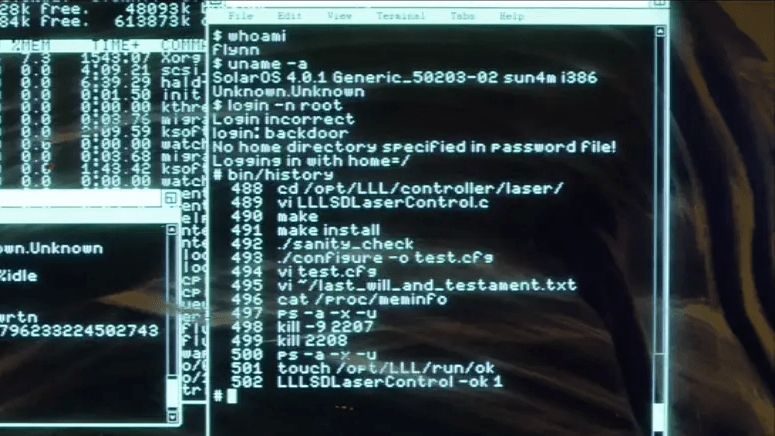
The scene in question shows the protagonist, Sam Flynn, entering several commands into his father Kevin's computer in his father's study, in an attempt to figure out what his father was doing just before his mysterious disappearance.
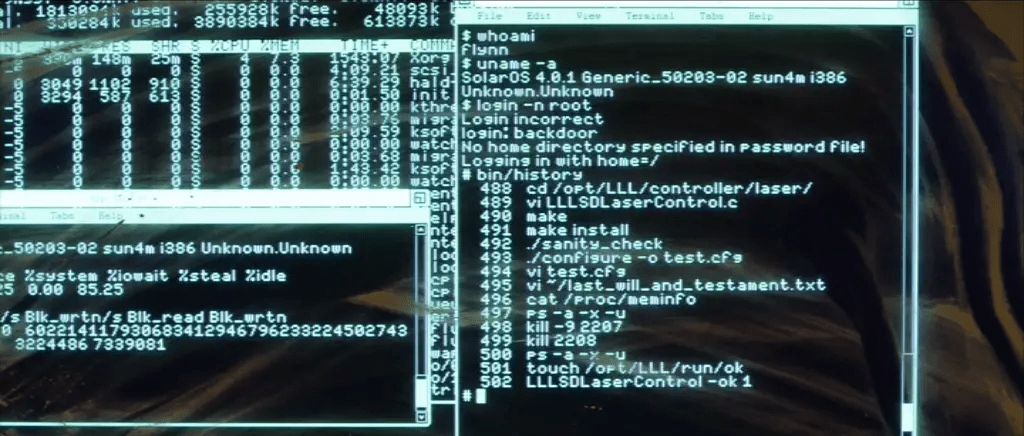
Since the terminal window on the right side of the screen was empty until Sam started operating the computer, everything displayed in the terminal window must be the commands Sam entered and their outputs. The following is a transcript of what was displayed in the terminal window.
[code]
$ whoami
flynn
$ uname -a
SolarOS 4.0.1 Generic_50203-02 sun4m i386
Unknown.Unknown
$ login -n root
Login error
login: backdoor
No home directory specified in password file!
Logging in with home=/
# bin/history
488 cd /opt/LLL/controller/laser/
489 vi LLLSDLaserControl.c
490 make
491 make install
492 ./sanity_check
493 ./configure -o test.cfg
494 vi test.cfg
495 vi ~/last_will_and_testament.txt
496 cat /proc/meminfo
497 ps -a -x -u
498 kills -9 2207
499 kills 2208
500 ps -a -x -u
501 touch /opt/LLL/run/ok
502 LLLSDLaserControl -ok 1
# ▮
[code]
◆What can be gleaned from the screenshot
At first glance, it's just an ordinary screenshot from a scene early in the story, but when terminal window developer Tatham examined it closely, he discovered several interesting things.
Command history
What Tatham first noticed was that the command Sam used to check the command history was '/bin/history' and not 'history'. Since the command history is maintained by the shell process itself, it is difficult to obtain information using an external command such as '/bin/history', and therefore 'history' must be a built-in shell command. Also, the actual history command is added to the command history before the command history is output, so the history command should appear at the end of the output list.
Tatham believes that the /bin/history command was a simple shell script that output a 'command history' instead of actual commands, describing it as 'like accidentally seeing the wires in a wire action scene.'
Computer account settings
The first thing Sam saw wasn't a login prompt, but a shell prompt. This meant his father, Kevin Flynn, had disappeared while still logged in. To check the login account, Sam first ran the 'whoami' command, which displayed 'flynn,' leading him to deduce that his father had logged in with a regular account without privileges. Thinking that he needed privileges to investigate, Sam tried to log in with the 'root' account, but failed. Instead, he tried logging in with the 'backdoor' account, which succeeded. At first glance, this seems meaningless since it wasn't a login with the root account, but the shell prompt has changed from the regular user's '$' to '#,' indicating that the shell is running with the same 'UID 0' as root. This means that the backdoor account shares the UID with the root account, and therefore it can be inferred that it also shares the home directory (the '/' set as the root home directory in older Unix systems) and command history.
However, Tatham has some questions regarding 'the use of the login command instead of the su command to switch users' and 'the inability to explain why a backdoor account was available on the father's personal computer.' While the backdoor account could be seen as a 'sloppy job by the screenwriter,' he offers the following as a more convincing explanation that fits the world of the story.
- The father had originally allowed his son to use the root account.
The son created a backdoor account without his father's knowledge.
- The father changed the root account for some reason so that his son could not use it.
The above storyline also explains why Sam initially tried to log in using the root account.
• Unix system
Another command Sam initially executed was 'uname -a,' a command that allows you to check what kind of Unix system the OS being investigated is. The OS name output by the uname command was 'SolarOS,' a name that seems to be a combination of ' SunOS ' and ' Solaris, ' both Unix series from Sun Microsystems. The fact that the output of the uname command also contains the string 'sun4m' further supports the possibility that it is based on an OS from Sun Microsystems.
On the other hand, the terminal window in the upper left appears to be running the top command, but its style matches that of Linux. Furthermore, the column displayed on the right side of the window contains process names typical of Linux (such as kthreadd, scsi_eh_XXX, migration, ksoftirqd, and watchdogd). The terminal window in the lower left appears to be the output of the iostat command, but again, it resembles the Linux style more than Solaris. In other words, Tatham points out that although the story is set in the Solaris machine, the characters are Linux machines, and it looks as if the costume and makeup team neglected the meticulous work of making the characters look the part.
Even more intriguing is the architecture information, where the uname output incorrectly displays both 'sun4m' and 'i386'. Since sun4m is SPARC -based hardware, it is inconceivable that it would coexist with x86 hardware.
- Execution order of configure commands
While reviewing the command history, Tatham noticed that the order in which the commands were executed was incorrect. Specifically, Tatham questioned the order in which the following commands were called around command history 490-493.
make
make install
./configure -o test.cfg
Normally, the configure script is used to configure the system, and then the make command is used to build it, so the configure script should be executed first. However, this assumes that the configure script was generated by Autoconf, but then the presence of the '-o test.cfg' option, which should not exist in the configure script created by Autoconf, becomes a problem. The presence of an option that shouldn't exist means that the configure command in the command history is a completely different entity that happens to have the same name as the script generated by Autoconf. In fact, it is reasonable for software packages that require complex configuration files to provide a script that automatically generates a template configuration file. Looking at the command history again, it can be seen that the configure script generates a template configuration file called test.cfg, and then test.cfg is edited with vi to correct the problems.
On the other hand, there is evidence that the LLLSDLaserControl command, which appears to be for the laser controller, was executed at the end of the command history, but it is highly unlikely that test.cfg was used here. This is because, judging from the command history, test.cfg was generated in the source code directory, and given the filename, it is unlikely that the software would load it by default. If the intention was to load test.cfg into the software, it would have been moved to the appropriate directory or the path specified in the startup options, but there was no trace of any attempt to use the edited test.cfg. Tatham believes that it was a mistake by the developer who forgot to instruct the program to use the configuration file at the end, but he also states that considering the fact that the actual shell command history is full of incorrect operations, it may not be entirely a mistake.
- Memory is released by terminating the process.
Running the laser controller likely consumes a large amount of free memory, and command history entries 496-500 suggest an attempt to free up memory. First, the father checked the amount of free memory using 'cat /proc/meminfo,' but it seems there wasn't enough free memory. Next, he ran the ps command to display a list of running processes and executed the kill command on several processes that appeared to be consuming a lot of memory. Finally, he ran the ps command again to confirm that the terminated processes had indeed disappeared from the list.
While the series of actions may appear consistent at first glance, Tatham raises doubts. This is because the father's objective was supposed to be 'freeing up memory,' and therefore the final command he should have executed was not the ps command, but rather 'cat /proc/meminfo' to confirm that sufficient free memory had been secured. However, he also mentions the possibility that the filmmakers faithfully depicted the father inadvertently taking actions he shouldn't have taken due to reasons such as being 'panicked,' 'distracted,' or 'excited.'
• Laser controller with dual safety mechanism
Just before executing the laser controller 'LLLSDLaserControl', the father executes 'touch /opt/LLL/run/ok'. The touch command has two functions: it updates the timestamp of existing files and creates files that do not exist. In the case depicted in the story, it is presumed that the file '/opt/LLL/run/ok' did not originally exist, and the command was executed with the intention of creating the file. The reason why the '/opt/LLL/run/ok' file was created is thought to be that if the file does not exist, the laser controller will not actually control the laser. In other words, the presence or absence of the '/opt/LLL/run/ok' file is a safety mechanism that reduces the possibility of the laser activating incorrectly.
The laser controller has another safety mechanism. In the last command history, the option '-ok 1' was specified when the laser controller was started. This means that the laser controller has two ways of confirming whether you really want to proceed with execution.
The practice of taking double safety measures is also seen in real-world Unix software, and is particularly employed in various parts of Git. For example, git-daemon will not provide a Git repository via HTTP unless a file named 'git-daemon-export-ok' exists in the repository directory, and git-clean will not actually delete files unless the -f option is specified.
However, Tatham is skeptical about whether the laser controller meets the requirements of stringent safety standards like ISO 26262, even with its dual safety mechanism. For example, when specifying '-ok 1' as a command-line option, as can be seen from the depiction in the game where it is directly displayed in the output of the history command, it can simply be recalled from the command history and re-executed, thus diminishing its significance as a safety mechanism. There is also the problem that the '/opt/LLL/run/ok' file persists once it is created. Since the laser controller was developed in secret, it is almost certainly the kind of software that 'one or two people are coding in a basement,' and while it may be trying to meet its own safety standards, it does not come close to industry-standard levels of safety, he points out.
Will file
Before firing the laser, the father edits a file called '~/last_will_and_testament.txt'. The file name translates to 'last will and testament,' which gives us an idea of how dangerous the actions he is about to take with the laser are. What the father actually did was fire the laser at himself, completely obliterating his physical body and turning it into a digital entity. The father (Kevin Flynn, the protagonist of the previous film 'Tron') had suffered the same fate at the hands of the opposing Master Control Program (MCP) in the past. This time, unlike last time, he has time to write a will, and he understands the risks of digitalization itself and the difficulty of returning to the real world, which is why he decided to create one.
However, Tatham points out that it is uncertain whether the father was calm when he created the will. Generally, a will requires a signature and witnesses, and above all, it should be stored in a place where someone can actually find it after death. One should not rely on the chance that someone might search the PC after death and find a file called 'will' in the home directory, and in the first place, it is thought that another will is needed to undergo
On the other hand, Sam is quite likely to be his father's executor, and he was indeed able to find the will. However, the validity of a will without a signature or witnesses is expected to be low. Upon further consideration, as analyzed in the 'computer account settings' section, Sam was able to find the will because he used the backdoor account, and considering the possibility that the backdoor account itself may have been something his father did not anticipate, it does not seem that his father's action of 'creating a will with the root account' was done with the intention of having the will found. However, Tatham also mentions the possibility that it was a staged accidental mistake by the father in line with the worldview, stating, 'If I were to perform an untested surgery on myself that might kill me, and no one had told me beforehand, I wouldn't be able to stay calm either.'
- Text rendering in the terminal window
The questions raised so far concern the content of the text displayed in the terminal window, but there have also been some strange points raised about the terminal window itself. Generally, monospaced fonts are used in terminal windows, but looking at the main terminal window in the screenshot, the text is displayed in a proportional font. You can clearly see that a proportional font is being used by looking at the line 'Login incorrect' followed by the line 'login: backdoor'. If it were a monospaced font, 'Login' and 'login' should have the same width at the word level, but in a proportional font, the width of the uppercase 'L' and the lowercase 'l' are different, so the widths are different even at the word level.

Furthermore, the text in the terminal window is displayed in a way called 'word wrap,' where each word is wrapped to the next line, which is not normal in a terminal window. In a normal terminal, if a simple command-line program's output to stdout exceeds the width of the terminal, it generally ignores word boundaries and wraps the excess text neatly to the next line, and in very rare cases, all the characters that exceed the screen width are overlaid in the right margin. 'uname -a' normally outputs all information on one line, so 'Unknown.Unknown' should be output on the same line as the other information, but as you can see in the screenshot, word wrap is occurring and the entire text is displayed on the next line.

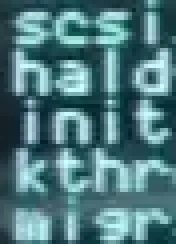
Based on our previous analysis of the screenshots from various angles, it's highly likely that an actual Unix system was involved. Therefore, there might be a terminal program that uses proportional fonts and supports word wrap. However, strangely, the terminal window displaying the output of 'top' in the upper left of the screenshot, while visually very similar, uses a monospaced font. If we focus on the four characters of each process, we can see that they have the same character width regardless of the difference in characters.
The final mystery
Tatham, who has been investigating and verifying various mysteries that can be gleaned from the screenshots, concludes by asking, 'If a laser controller running with root privileges fired a laser from behind the computer chair and digitized the person sitting there, why wasn't the computer logged in as root, but rather a blank terminal window logged in with a regular user account when Sam found it? Perhaps there is a clever system in place that would time out the computer after a certain period of time if it were left logged in as the root account?'
◆Reader comments
When Tatham published his blog, he received a variety of responses from readers. Among them were some insights that Tatham and his colleagues had not considered.
- It's possible that while editing test.cfg in vi, you used the ':w' command to save it as laser.cfg in the correct path.
- Some Unix-like operating systems other than Linux allow you to setuid using the login command.
- An article by a VFX artist for 'Tron: Legacy' mentions using Emacs and its eshell mode to record shell sessions.
- The shell session may have been manually pasted frame by frame into an application that uses word wrap or proportional fonts and then played back.
- Easter egg related to 'LLL': This is derived from the fact that the original 'Tron' was filmed at Lawrence Livermore Laboratory.
Related Posts: