Google Chrome 150 stable version released, enabling features like adjusting font sizes to fit frames and creating gradient borders using only CSS.

The latest stable version of the web browser 'Google Chrome,' version 150, has been released. New features include the 'text-fit' property, which allows you to adjust the font size of headings and dynamic content to fit the frame width using only CSS; the 'focusgroup' attribute, which allows you to declaratively specify focus movement using arrow keys; and 'background-clip: border-area,' which makes it easier to create gradient borders using only CSS.
New features in Chrome 150 | Blog | Chrome for Developers
Chrome 150 | Release notes | Chrome for Developers
https://developer.chrome.com/release_notes/150?hl=ja
◆ 'text-fit' - Makes text fit the width of a frame using only CSS
`text-fit` is a property that adjusts the font size of a text node so that it fits perfectly within the width of the box containing the text.
Previously, fitting text of varying length, such as headings, usernames, product names, and score displays, within a limited width required using JavaScript to measure character count and element width to calculate font size, or combining multiple CSS specifications. Chrome 150 and later makes it easier to adjust font size based on container width using CSS alone.
The following example shows the same text in the same font size, but with 'text-fit' applied only to the bottom box. You can see that in the bottom box where text-fit is applied, the text automatically expands to fit the width.
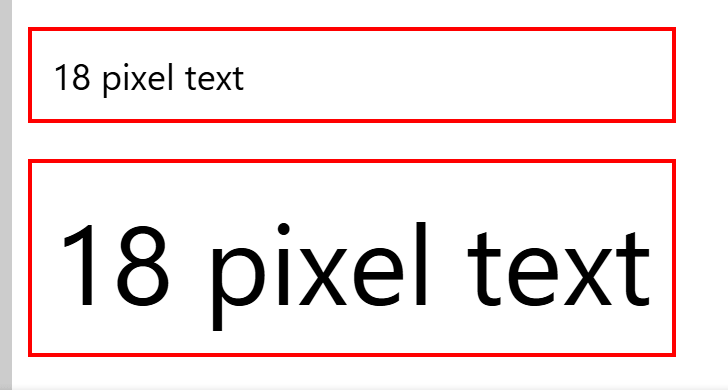
This feature makes it easier to visually align headings and text within cards, even when the screen width changes in a responsive design.
◆ 'focusgroup' allows you to declaratively specify focus movement using arrow keys.
Chrome 150 added the 'focusgroup' attribute to HTML. Using 'focusgroup,' you can declaratively specify how focus is moved using the arrow keys in composite widgets such as toolbars, tab lists, menus, and custom UI components.
For example, if you specify 'focusgroup='toolbar wrap'' for the element surrounding a group of buttons, as shown below, the user will be able to move between the buttons using the arrow keys on their keyboard.
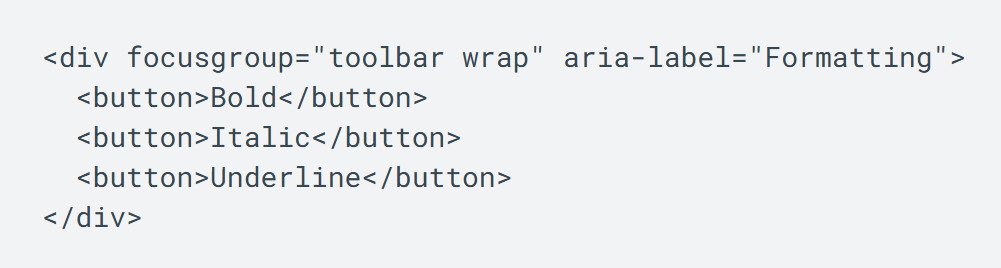
Previously, implementing such UIs in an accessible way required manually writing focus control code called 'roving tabindex' in JavaScript. Using focusgroup makes it easier to delegate tasks such as the starting point for tab navigation, navigation using arrow keys, and remembering the last focused element to the browser.
◆Makes it easier to create gradient borders using only CSS.
Chrome 150 added a new value, 'border-area,' to the CSS 'background-clip' property. 'background-clip: border-area' specifies that the background of an element will be clipped to the area where the border is drawn. It takes into account border-width and border-style, but ignores the transparency of border-color, making it easier to create effects such as displaying a background gradient only in the border area.
While it was previously possible to create gradient borders using 'border-image' or pseudo-elements, implementation tended to be complex. Chrome 150 and later versions offer a more CSS-native way to implement gradient borders.
◆ PWA origin migration is now possible.
Progressive Web Apps (PWAs) have a strong connection between their origin at the time of installation and their identity and permissions. Therefore, when changing the origin of a PWA due to a service rebranding, domain reorganization, or technical restructuring, users traditionally had to uninstall the old app and reinstall the new one.
Chrome 150 introduces a mechanism to migrate installed PWAs to a new origin within the same site. PWA origin migration makes it easier for developers to migrate installed PWAs to a new origin within the same site while maintaining user trust and permissions. However, for PWAs that have been forcibly installed by enterprise administrators, the migration will be blocked to prevent circumvention of management policies, and an explanatory banner will be displayed to the user.
◆The quality level of on-device voice recognition can now be specified.
Chrome 150 adds a 'quality' property to the 'SpeechRecognitionOptions' of the Web Speech API. The 'quality' property allows developers to specify the required recognition quality when using on-device speech recognition with 'processLocally: true'. Three quality levels are envisioned: 'command,' 'dictation,' and 'conversation,' allowing developers to specify the capabilities required for different applications, such as command recognition, text dictation, and conversation transcription.
In cases requiring high accuracy, such as transcribing meeting transcripts, it becomes easier to implement a system that determines whether processing can be done using only a local device and falls back to a cloud service if necessary.
◆data: Enhanced security for Workers created via URLs
Chrome 150 changes how dedicated Workers and SharedWorkers handle 'data: URL'. Previously, Workers created with data: URL could inherit the security origin of the script or page that created them. Chrome 150 will now assign a unique, opaque origin to these Workers.
This reduces the risk of accessing the same origin state as the source through BroadcastChannel or same-origin storage, thereby strengthening worker isolation.
◆Other updates
- The 'AccentColor' and 'AccentColorText' system colors have been added, allowing you to reference the user's OS accent color in CSS. These can be used in situations where integration with the OS theme is required, such as with installed web applications.
- The CSS ` polygon() ` function now allows you to specify an optional parameter for rounding corners.
- The CSS ' zoom ' property can now be animated.
- The CSS ` url() ` function now allows you to specify request modifiers such as `cross-origin()`, `integrity()`, and `referrer-policy()` .
- The CSS function ' image(<color>) ' can now be used to generate a single-color image of any desired color.
- The CSS ' light-dark() ' function now supports image values , allowing you to switch background images and other elements according to the color scheme.
- The ' @container ' rule now allows you to specify multiple comma-separated container queries .
- A CSS descriptor ' page-margin-safety ' has been added to avoid printing areas that the printer cannot print.
- The ' flex-wrap: balance ' property now allows for a more balanced arrangement of Flex items that wrap across multiple lines.
- The ` named-feature() ` function can now be used with CSS's ` @supports` flag.
- A new value, ' chain ,' has been added to ' overscroll-behavior .'
- A CSS property ' path-length ' has been added that corresponds to the SVG presentation attribute ' pathLength '.
- Improved the behavior when multiple ' <selectedcontent> ' elements are placed and when they are updated.
- ' Out of order streaming ' has been introduced, which allows you to update existing parts of a document without JavaScript using ' <template for> ' and processing command ranges.
- The HTML parser can now analyze processing instructions .
- The interaction between ' popover=hint ' and ' popover=auto ' has been clarified, making popover stack management more predictable.
- Element and Window scroll methods now return a Promise that resolves when programmatic smooth scrolling is complete.
- SVG filters are no longer applied to embedded plugins, cross-origin iframes, and restricted iframes.
WebGPU now includes an immediate address space and the ` setImmediateData() ` method for passing small amounts of frequently updated data to shaders without GPU buffers or bind groups.
◆Origin Trial
・Email Verification Protocol
This system uses cryptographic proof of ownership to assist with account creation, login, and recovery, instead of users manually entering a one-time password sent via email.
・Speculative load measurement
This allows you to obtain measurement data related to speculative loading, such as preloading, prefetching, and prerendering, using the `performance.getSpeculations()` method.
・WebRTC Diagnostic Logging API
This API allows applications to enable WebRTC diagnostic logs. Diagnostic logs can be enabled on origins permitted by enterprise policy and can be used for local debugging and bug reporting. It's also possible to upload them to browser vendors if needed.
The next stable version, 'Google Chrome 151,' is scheduled for release on Tuesday, July 28, 2026 (local time).
Related Posts:





in Software, Posted by log1d_ts