Cloudflare has unveiled a system that allows users to control their AI bots by type, such as 'search,' 'proxy operation,' and 'learning,' and even the free plan allows users to set options like 'allow search, deny AI learning.'

Cloudflare has announced the release of a new access control option for all users that allows them to manage AI-related bots accessing their website on a per-purpose basis. The new option allows users to configure settings such as permitting crawling for search purposes while restricting access for agents that train AI models or operate on behalf of users.
Your site, your rules: new AI traffic options for all customers
Search engines like Google Search allow crawlers to read pages and display them in search results, enabling readers to find the content they're looking for. However, there are increasing cases where the same page content is used to train AI models, without generating the same traffic or return as search results. Cloudflare explains that the traditional relationship of 'crawlers visiting sites and sites gaining referral traffic' is breaking down.
This forces website operators to make a difficult choice: 'We want our content to appear in search results, but we don't want it used to train AI.' For small blogs and news sites, blocking crawlers entirely makes it harder for readers to find them. However, allowing all automated access means AI companies could collect content and use it to train their models. Cloudflare felt that 'these two options are insufficient for website operators,' and introduced a system to handle AI traffic more granularly.
In the new classification, AI-related bots are mainly divided into three types: 'Search,' 'Agent,' and 'Training.' 'Search' is access that collects and indexes pages for generating search results and answers, and is expected to return referral traffic or some form of compensation to the site operator. 'Agent' is access that performs tasks in real time on behalf of the user, such as a chat AI opening a page at the user's request, or Gemini or Claude operating the browser. 'Training' refers to crawling pages to use their content for training and fine-tuning the AI model.
Cloudflare's previous version had a management preset called 'Block AI Bots' that blocked AI bots, primarily targeting single-purpose bots used for model training. This announcement expands on existing functionality, allowing for a more flexible approach: instead of blocking all AI bots at once, it will be possible to allow bots for 'search,' deny them for 'training,' and make decisions on their purpose for 'proxy operations.' Cloudflare explains that as AI usage expands to include search, chat, browser operations, and training, it's necessary to treat bots not simply as 'AI,' but based on 'what they do on the website' and 'how the acquired content is stored and reused.'
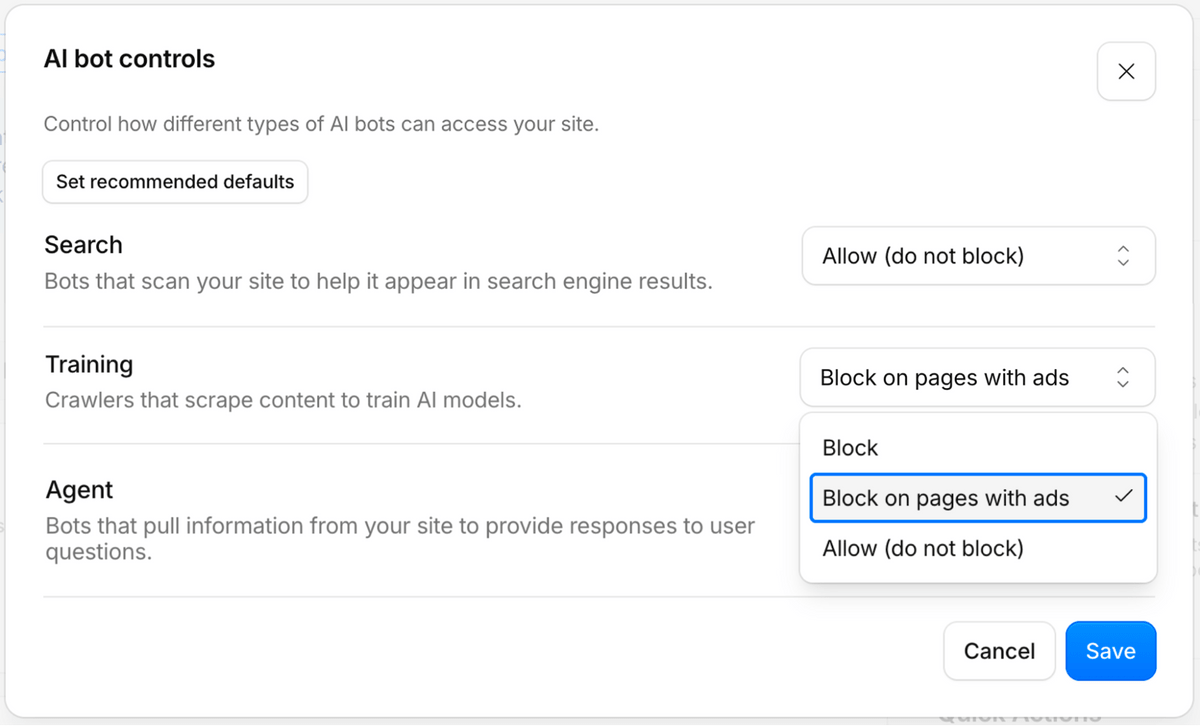
Furthermore, if a single crawler has multiple purposes, it will be treated under multiple categories. For example, a bot used for both creating search indexes and AI training will be classified as both 'search' and 'training.' Cloudflare states that from September 15, 2026, the most restrictive rules will apply to multi-purpose crawlers that serve both 'search' and 'training.' This means that users who have chosen to block 'training' or who have enabled the traditional Block AI Bots may also have multi-purpose crawlers such as Googlebot, Applebot, and BingBot blocked.
Furthermore, Cloudflare announced that starting September 15, 2026, for any new domains added to Cloudflare, 'training' and 'proxy access' will be blocked by default on pages displaying ads, while 'search' will be allowed by default. This is because pages displaying ads are intended for human readers to visit and view the ads, and AI learning and agent-based access could potentially deprive human visitors of opportunities to visit. On the other hand, Cloudflare sees that allowing 'search' is beneficial for many site operators because it leads to increased reader traffic.
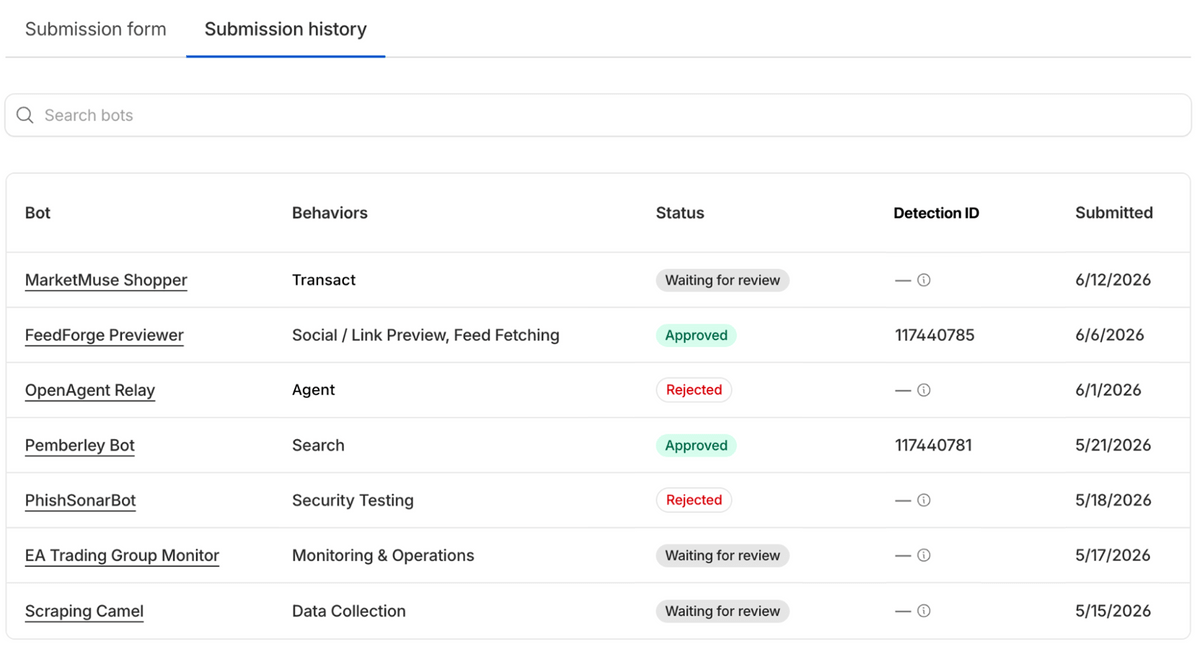
For Enterprise Bot Management users, Cloudflare has also released a new feature called 'BotBase.' BotBase is a database that allows you to search for known bots and agents that Cloudflare tracks, and you can see on the Cloudflare dashboard which category each bot falls into, such as 'Search,' 'Proxy Operation,' or 'Training.' If you want to create rules that target only specific bots, you can narrow down the traffic of the target bot or copy the detection ID to use in security rules.
Mechanisms are also being developed to indicate the extent to which content acquired by bots will be reused. Cloudflare has explained three levels of content use: 'immediate,' 'reference,' and 'full.' 'Immediate' means use without saving or reusing, 'reference' means use with indexing, excerpts, and linkbacks, and 'full' means use including summarization and republication. Cloudflare has started testing adding a new specification such as 'use=reference' to Content Signals that can be written in robots.txt, and users who have enabled Cloudflare-managed robots.txt will have an added indication to the effect of 'search is allowed, AI learning is denied, and use is limited to reference.'
Furthermore, while Cloudflare previously granted access to any Verified bot whose identity and purpose had been verified, Cloudflare will revise this policy from July 1, 2026, changing it to automatically granting access based on whether the bot belongs to an permitted category such as 'search.' Cloudflare strongly recommends that bot operators operate crawlers separately for different purposes such as search, agent, and learning, with the aim of making it easier for site operators to understand 'why they are being accessed.'
Cloudflare states that despite these changes, their commitment to a trust-based web remains unchanged: even as the web landscape continues to evolve, content creators can determine how their content is used, and bots that are honest about their purpose are more likely to gain access. The new AI traffic management options are already available at the time of writing and can be configured from the Cloudflare management console.
Related Posts:







in Web Service, Posted by log1d_ts