Google Chrome 149 stable version released, now supports CSS gap decorations, allowing you to specify the style of CSS gaps.
The latest stable version of the web browser ' Google Chrome ,' version 149, has been released. It includes support for 'CSS gap decorations,' which allows you to add lines and decorations to the 'gap' in layouts such as grids and flexboxes, as well as the ability to save pages connected via WebSocket to a back-forward cache (bfcache).
New in Chrome 149 | Blog | Chrome for Developers
◆ You will be able to draw lines using the 'gap' property in CSS.
Chrome 149 introduced 'CSS gap decorations,' a feature that allows you to add borders and decorations to the 'gap' used in CSS Grid, Flexbox, and multi-column layouts.
Traditionally, adding lines between items in grids or flexboxes required specifying a border for each element, placing pseudo-elements, or using background images or complex CSS to simulate lines. Since Chrome 149, however, you can use 'column-rule' and 'row-rule' to add style to the gaps within the layout itself.
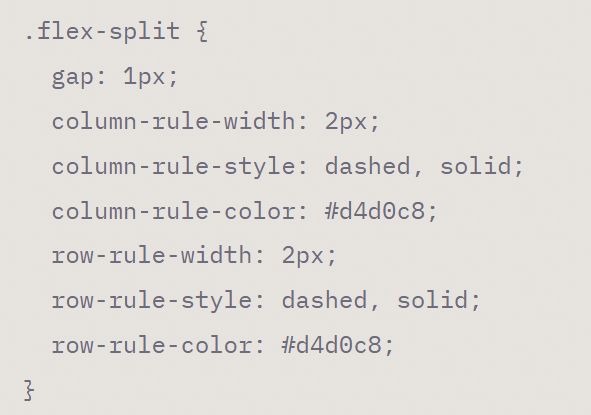
For example, to add a line to the gap in Flexbox, you can write it as follows. Below, we specify a dotted and solid line with a width of 2px and the color ' #d4d0c8 '.
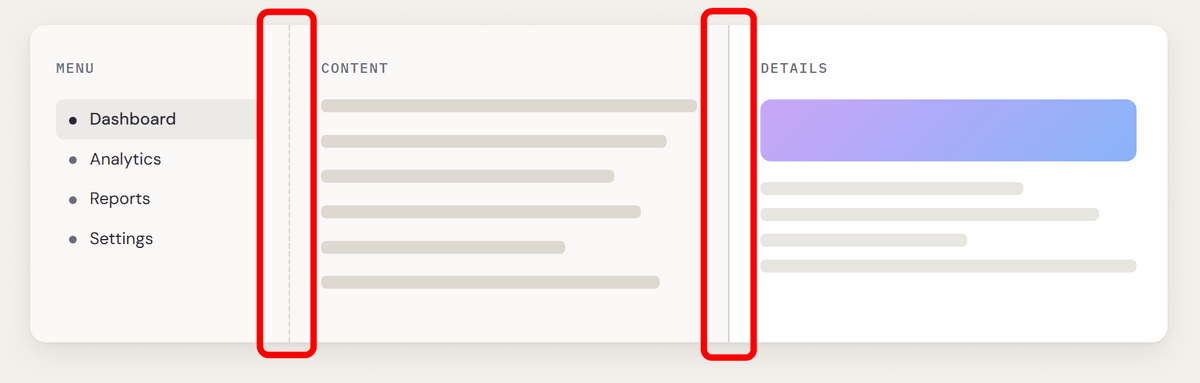
When viewed in a browser that supports CSS gap decorations, it looks like this: You can see that the first gap has a dotted line, and the second gap has a solid line with a width of 2px and the color '#d4d0c8'.
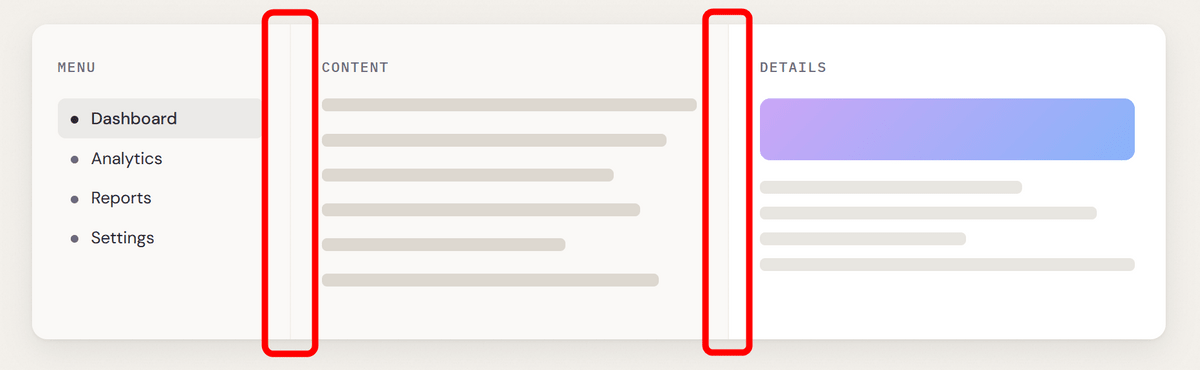
Furthermore, in unsupported browsers, the settings will simply be ignored, as follows.
Additionally, you can use 'column-rule-inset' and 'row-rule-inset' to shrink the ends of lines inward, or use 'column-rule-visibility-items' and 'row-rule-visibility-items' to display lines only between adjacent items. The line width, color, and inset also support animation, allowing for effects such as changing decorations on hover.
◆Pages connected via WebSocket can now also be saved to bfcache.
Chrome 149 now allows pages with active WebSocket connections to be saved to the back-forward cache, commonly known as 'bfcache'.
bfcache is a mechanism for instantly restoring pages from memory when a user performs a 'back' or 'forward' operation. Previously, pages with an active WebSocket connection were excluded from bfcache and were discarded when the user left the page.
Chrome 149 now closes the WebSocket connection before the page enters the bfcache, saving the page itself in memory and allowing for faster restoration during back and forward operations.
◆Language variants can now be obtained using Intl.Locale.
The JavaScript `Intl.Locale` method now includes a `variants` property. This allows you to get and set the language variants included in the Unicode locale identifier.
For example, you can retrieve the variant 'rozaj-biske' included in the locale 'sl-rozaj-biske' with the following code:
[code]const locale = new Intl.Locale('sl-rozaj-biske');
console.log(locale.variants); // 'rozaj-biske'[/code]
This feature was already implemented in Firefox and Safari. It was added to Chrome in version 149, meaning all major browsers now support it.
◆The abbreviated text display will be temporarily disabled during operation.
When a user performs actions such as editing or moving the cursor over text that has 'text-overflow: ellipsis' specified in CSS, the text will now temporarily switch from displaying ellipsis to displaying a paperclip.
This makes it easier for users to see and interact with the end of text that was previously omitted and hidden. This change applies to both editable and non-editable elements.
◆The range of shapes that can be specified with shape-outside has been expanded.
The CSS 'shape-outside' property now allows you to use geometric functions such as 'path()', 'shape()', 'rect()', and 'xywh()'.
The `shape-outside` property is used to wrap text around images and shapes. In Chrome 149, it became possible to specify more flexible shapes and it also became easier to animate shapes.
◆Other updates
- The 'border-color: gray' specification, which does not exist in the HTML specification, has been removed from the UA stylesheet of the table element, and the border color is now determined based on currentColor .
- The matching of ':hover', ':active', and ':focus-within' properties to the parent element has been changed so that it stops at the boundary of the top layer element.
- The range of system accent colors obtainable from CSS keywords ' AccentColor ', ' AccentColorText ', and 'accent-color: auto' has been restricted to web applications and the initial profile context.
- 'image-rendering: crisp-edges' is now supported, allowing images to retain their outlines when enlarged.
- A CSS property ' path-length ' has been added that corresponds to the 'pathLength' attribute of SVG .
- The Payment Request API now allows payment handlers to distinguish between 'user cancellation' and 'internal payment app error' when returning a payment.
- On Windows touch keyboards, automatic correction can now be suppressed when 'autocorrect='off'' is specified in the input field.
The Async Clipboard API now includes ' Selective Clipboard Format Read ,' which delays the actual retrieval of clipboard data until the ' getType() ' call is made.
◆Origin Trial
Chrome 149 adds the following new origin trials:
・Gamepad event-driven input API
・Permissions Policy: focus-without-user-activation
・WebAssembly custom descriptors
The next stable version, 'Google Chrome 150,' is scheduled for release on Tuesday, June 30, 2026 (local time).
Related Posts:
in Software, Posted by log1d_ts