'Google Chrome 145' stable release, supports wrapping in multi-column layout

The latest stable version of the web browser Google Chrome , version 145, has been released. It introduces several new features, primarily CSS, including support for wrapping in multi-column layouts.
Chrome 145 | Release notes | Chrome for Developers
◆ Wrapping in multi-column layout
The CSS properties column-wrap and column-height defined in CSS Multi-column Layout Module Level 2 have been implemented. These properties allow you to specify whether content in a multi-column layout should wrap to the next column if it exceeds the height of the column.
[code]
.columns {
column-height: 70vh;
column-wrap: wrap;
}
[/code]
Previously, if a multi-column container had a limited height and content that did not fit in the available space, the content was displayed inline as an overflow column.

This update adds the column-height and column-wrap properties, which allow you to set the row height of a column and force overflowing columns to appear on a new row.
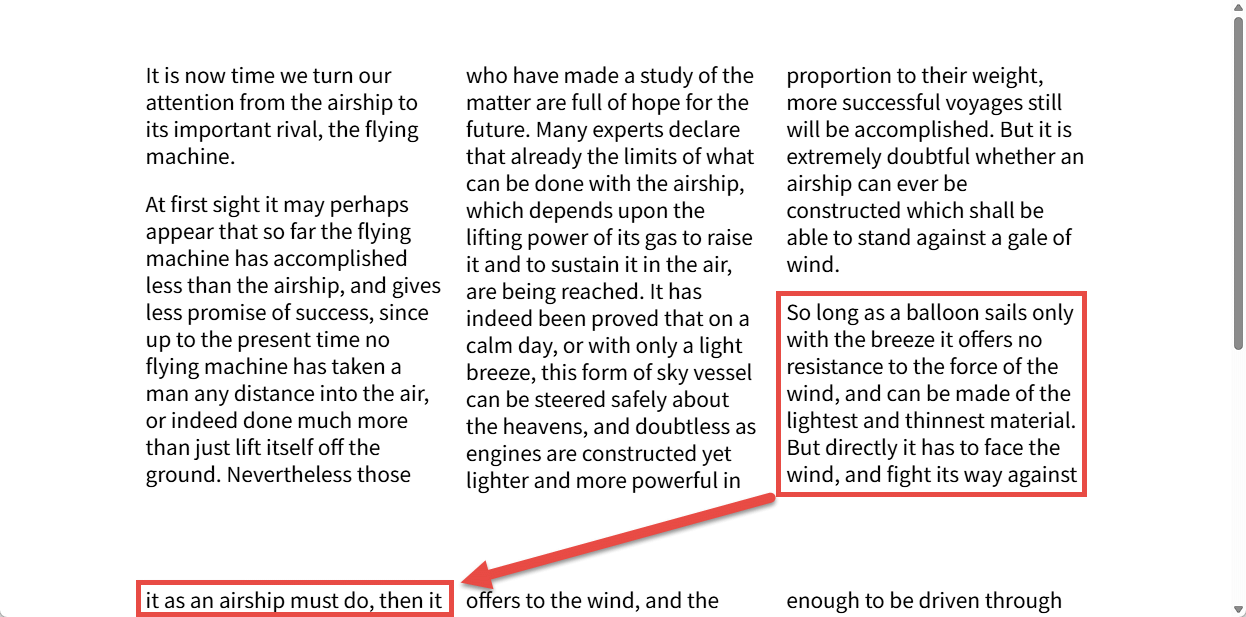
Previously, users had to scroll up and down to read through long content, or use the horizontal scroll bar that appeared when overflow occurred. This update allows columns to wrap, making content easier to read.
◆Origin API
'Origins' are a fundamental component of web implementations and are essential to both the security and privacy boundaries maintained by user agents. This update implements the Origin API , which encapsulates information about origins and provides methods for retrieving and manipulating them. This API allows access to various information related to origins, and allows origins to be compared, serialized, and analyzed through methods on the Origin object. Previously, origins were not directly exposed, and while various getters were available, they returned serialized versions of the origin, which could lead to vulnerabilities when comparing origins and sites. With the introduction of the Origin API, this update makes it possible to manipulate information about origins safely and efficiently.
◆Device-bound session credentials
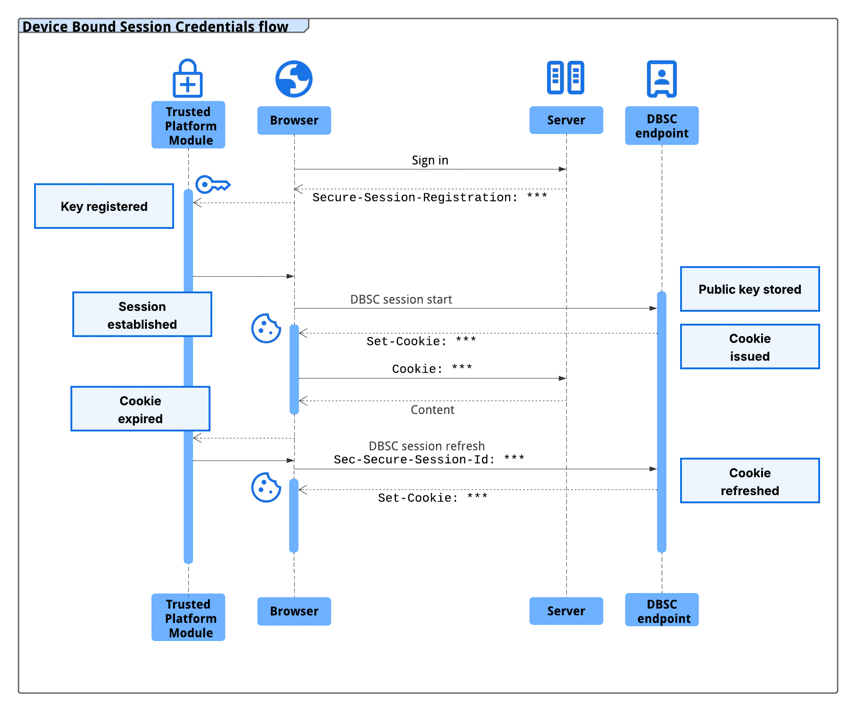
DBSC uses a short-lived cookie and a hardware-stored key pair to bind an authentication session to a device, and the browser periodically proves possession of the private key and updates the session cookie. The high-level flow of DBSC is as follows:
1: When a user logs in, the server responds with a long-lived cookie and a Secure-Session-Registration header.
2: At the /StartSession endpoint, the server associates the received public key with the session and replaces Chrome's long-lived cookies with short-lived cookies.
3: When a 'short-lived cookie' expires, Chrome sends a refresh request to the server's /RefreshEndpoint endpoint, and the server responds with a challenge .
4. Chrome signs the challenge using its stored private key, and the server verifies the signature and returns an updated short-lived cookie.
Improved calculations to make shadows and clipping boundaries for nearly circular elements more natural visually.
With this update, the shadow and clip boundaries of elements with border-radius close to 50%, i.e., nearly circular, now accurately match the visual contours of curves, making the rendering of complex rounded shapes more consistent and eliminating visual differences at larger radius values. Specifically, the border-radius adjustment factor that makes corners appear sharp at small radii now gradually decays as the radius value approaches 50%. Note that this change also applies to non-rounded contours using corner-shape , since they use the same radius adjustment mechanism.
◆Added the onanimationcancel event handler to the GlobalEventHandlers interface.
CSS Animations Level 1 adds four new event handlers to the GlobalEventsHandler interface:
・onanimationstart
・onanimationiteration
・onanimationend
・onanimationcancel
As a result, the onanimationcancel event handler, which did not exist in the GlobalEventsHandler IDL, is now exposed.
◆Customizable <select> list box support
Customizable <select> support has been extended to include support for single and multiple selection in listbox rendering mode, where the <select> element is rendered in-flow or in-page rather than as a separate button or popup, and is opt-in across the platform via the multiple and size attributes, e.g., <select multiple> and <select size=4>.
◆Other changes
CSS: Support for the text-justify property
CSS: The letter-spacing and word-spacing properties now accept percentage values.
CSS: Enable monochrome emoji rendering in forced color mode
UI: focus() method calls can now specify a focusVisible Boolean value.
UI: Improved overscroll effect on non-root scrolling containers
・Feature: Fixed window position information to be accurate on Android
・JavaScript: Implementing Upsert methods
JavaScript: Supports Key-Value API for crash reporting
- Policy: Changed to send a truncated User-Agent string by default
Navigation API: Expose to(NavigationDestination) innavigation.transition
- Secure payment confirmation: Browser bound keys supported
Secure Payment Confirmation: Updated UX elements in SPC dialog
Cookies: Support for maxAge attribute in Cookie Store API
Delete command for uncollapsed selection now reports correct inputType value
Implemented sticky user activation for clipboardchange events
Multimedia: Added access to rtpTimestamp metadata for video frames retrieved from WebRTC sources.
・IndexedDB : Replaced with SQLite execution
Web app: Added confidence field to PerformanceNavigationTiming object.
- Performance entry: Added presentationTime and paintTime
LayoutShift API: Attribution data changes from physical pixels to CSS pixels
- Separating local network access permissions
・Trusted Types : Specification adjustments
・WebGPU: Support for subgroup_uniformity function
Independent web apps: Introduce the WebRequest.SecurityInfo API in ControlledFrame.
◆Origin Trial
- JPEG XL (image/jxl) decoding support
WebAudio : Added the renderSizeHint option to AudioContext and OfflineAudioContext.
◆ Functions that will be discontinued or deleted
- For macOS: Removed support for old virtual cameras
- BMP extension: Removed the function to embed JPEG/PNG into BMP
Google Chrome 145 also includes numerous security bug fixes .
The next stable version, 'Google Chrome 146,' is scheduled to be released on Tuesday, March 10, 2026 local time.
Related Posts:






in Software, Posted by log1c_sh