'Firefox 141' official release, WebGPU now available on Windows
The official version of the web browser ' Firefox 141 ' has been released. The WebGPU API has been released, but only for the Windows version.
Firefox 141.0, See All New Features, Updates and Fixes
◆WebGPU API now available on Windows
With this update, the Windows version of WebGPU API has been released.
Shipping WebGPU on Windows in Firefox 141 – Mozilla Gfx Team Blog
https://mozillagfx.wordpress.com/2025/07/15/shipping-webgpu-on-windows-in-firefox-141/
WebGPU is positioned as the successor to WebGL , providing an interface for web content to access graphics processors, enabling high-performance calculations and rendering. The WebGPU API is defined by two W3C standards, WebGPU and WGSL , and Mozilla began developing it in 2017. This release only supports Windows, but macOS and Linux will be available in the coming months, and eventually Android. WebGPU is expected to raise the bar for games, visual effects, and local calculations on the web.
WebGPU Samples
https://webgpu.github.io/webgpu-samples/
◆ AI-enhanced Tab Groups
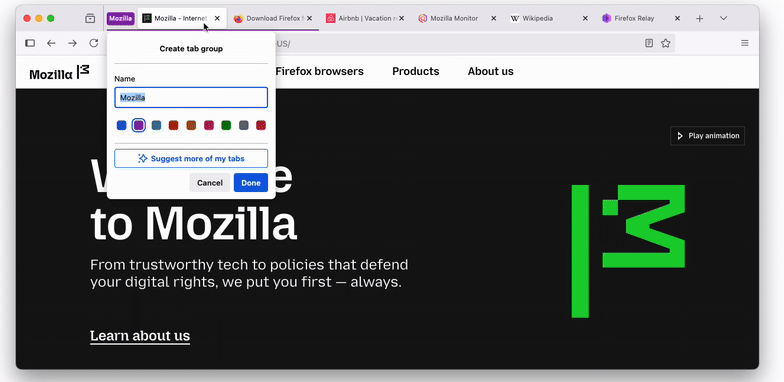
You can now use AI to automatically organize your tabs. This is an experimental feature, so it won't be released to all users at once, but will be gradually introduced.
How to use AI-enhanced tab groups | Firefox Help
https://support.mozilla.org/en-US/kb/how-use-ai-enhanced-tab-groups
The local AI model identifies similar tabs, automatically organizes them into groups, and even suggests appropriate group names to the user. When you first create a tab group, you can drag and drop a tab on top of another tab, or right-click on a tab and select 'Add this tab to a new group.' When you right-click on a tab group created in this way, 'Manage Tab Groups' will be displayed, and if there are tabs that the AI has determined can be suggested for this group based on similarity, a 'Suggest more tabs' button will be displayed, and selecting this will display candidates for adding to the tab group.
◆ HTMLInputElement.webkitdirectory property is now partially supported on Android
The HTMLInputElement.webkitdirectory property is now partially supported in Firefox for Android. This Boolean property, which corresponds to the HTML webkitdirectory attribute, allows you to dynamically switch between selecting files only or directories (folders) in the file selection dialog using JavaScript. Note that when using webkitdirectory, File.webkitRelativePath does not include information about the directory structure, so if you need the directory structure, you will need to consider another method.
◆ bfcache has been added to the list of targets to be cleared using the 'Clear-Site-Data: 'cache'' response header.
When the ' Clear-Site-Data: 'cache' ' response header is received, the back/forward cache (bfcache) will also be cleared. This prevents, for example, a situation where a user signs out and then someone else looks back in the history, revealing personal information that was displayed during the previous session to a third party.
◆CSS font-variant-emoji property
CSS now has the font-variant-emoji property as the default rendering style for displaying emoji characters. This was previously done by adding a variant selector to the emoji code point, such as 'U+FE0E' for text and 'U+FE0F' for emoji. The property takes one of the following keyword values:
normal : Allows the browser to choose how to display emoji, often following the operating system settings.
text : Renders the emoji as if it were using the Unicode text variant selector (U+FE0E).
emoji : Renders emojis as if they were using the Unicode emoji variant selector (U+FE0F).
unicode : Renders emoji according to the emoji presentation properties. If a U+FE0E or U+FE0F variant selector is present, it overrides this value setting.
◆PointerEvent:Added persistentDeviceId property
The persistentDeviceId property of the PointerEvent interface is now supported. When there are multiple pointing devices that operate the screen, such as using a mouse and a pen at the same time, a unique ID is assigned to each device and retained during the session. This ID makes it possible to reliably identify which device is responsible for an operation, even when multiple pointing devices are operating the screen at the same time.
◆ Dialog's closedby attribute and closedBy property
The <dialog> element now implements a closedby attribute and an associated closedBy property that indicates what user actions can be used to close the dialog. There are three possible ways to close a dialog:
- Clicking or tapping outside the popover (simple user action)
- Platform-specific user actions (e.g. pressing the ESC key on a PC, or 'back' or 'close' gestures on a mobile device)
- A developer-specified mechanism (such as a button click handler that calls HTMLDialogElement.close(), a <form> submit, etc.)
In contrast, the closedBy property can have the following values:
any : The dialog can be closed using any of three methods
closerequest : The dialog can be closed by either a platform-specific user action or a developer-specified mechanism.
none : The dialog must be closed using a developer-specified mechanism
If no valid value is specified, the behavior will be the same as closerequest for dialogs opened by showModal(), and none for all other dialogs.
◆ Added HTMLElement.showPopover() and HTMLElement.togglePopover() functions
The showPopover() and togglePopover() methods of the HTMLElement object now take an options.source argument that references the source of the popover, as well as an options.force argument that forces the popover to be opened or closed.
◆Other changes
- Reduced memory usage on the Linux version, eliminating the need to reboot after applying updates via the package manager
Address autofill is now enabled for users in Brazil, Spain, and Japan
- Browser address bar can now be used as a unit converter (supports length, temperature, mass, force, angle measurement units, and time zone conversion)
The Valencian build of Firefox now includes a Catalan (a sister language of Valencian) spell checker dictionary.
- Added new languages for translation (Albanian, Gujarati, Hebrew, Hindi, Kannada, Malay, Malayalam, Persian, Telugu)
- On Windows 11, the system font icons are now used for the caption buttons, improving compatibility with the OS.
- Added the i18n.getPreferredSystemLanguages method to obtain the OS's preferred locale (complementary to the i18n.getAcceptLanguages method).
Support for CHIPS (Cookies with independent partition state) has been re-enabled
Firefox 141 also includes 18 security bug fixes .
The next major version, Firefox 142, is scheduled to be released on Tuesday, August 19, 2025 local time.
Related Posts:






in Software, Posted by log1c_sh