A certain app reported an unusual memory leak and was fixed.
Finding and Fixing Ghostty’s Largest Memory Leak – Mitchell Hashimoto
https://mitchellh.com/writing/ghostty-memory-leak-fix
What is a memory leak?
A memory leak is a phenomenon in which a program holds on to memory it has used without releasing it. When a memory leak occurs, the computer system's available memory gradually decreases, resulting in poor performance and eventually causing the system to crash or freeze.
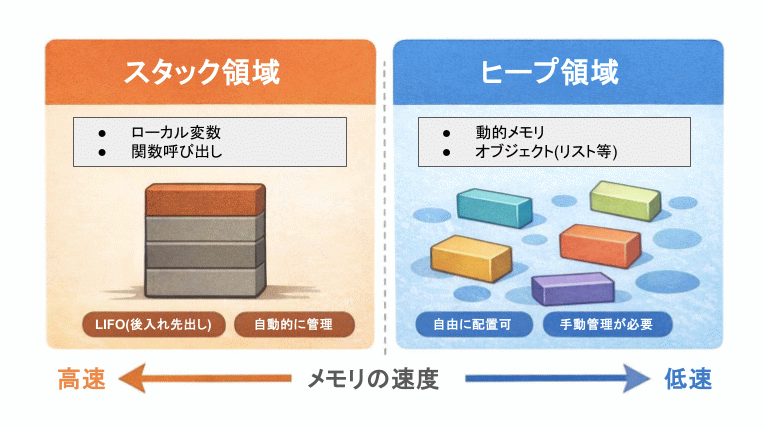
When considering why memory leaks occur, it is important to understand that there are two types of memory areas managed by the system: 'stack area' and 'heap area.' Stack area is used for function calls and local variable management; it has a fixed available memory size, but is automatically released when the function terminates. Heap area, on the other hand, is used to dynamically allocate memory; it has the advantage of being able to freely specify memory size at runtime, but it remains retained unless the program explicitly releases it. System calls are used to allocate and release memory in the heap area; in this article, these calls are mmap() and munmap() . Memory leaks are a phenomenon seen in the heap area, and occur when a program forgets to release dynamically allocated memory.
Even when dynamically allocating memory, modern programming languages have a mechanism called
Ghostty memory leak
Ghostty users have started reporting mysterious memory consumption to the developer. In one case, a user reported consuming as much as 37GB of memory. During the investigation, the following facts were discovered:
The cause of the memory leak existed from the early days (Ghostty 1.0), but the conditions for its occurrence were never met.
- The conditions for a memory leak to occur were met when using a popular CLI application.
-Memory leaks are particularly noticeable when using Claude Code .
Identifying the cause was extremely difficult because the conditions under which the problem occurred were limited.
Ghostty Memory Management
To understand why the memory leak occurred, we need to understand how Ghostty manages terminal memory. Ghostty stores terminal content in a data structure called a ' page list .' The page list contains multiple 'memory pages' that store terminal content such as characters, styles, and hyperlinks, and is managed as a doubly linked list .

The pages that form the basis of the page list are allocated memory using mmap(). However, mmap() is not particularly fast, so a 'memory pool' is also used to avoid having to call it every time. When creating a page, a free page is first searched for in the memory pool, and if one is not found, a new page is allocated using mmap(). When the page is no longer needed, it is returned to the memory pool and waits for an opportunity to reuse it. The memory pool has a 'standard size' for pages. A familiar image is that it is similar to having a standard-sized storage box that allows for flexibility in many situations.
However, there are cases when the terminal requires more memory than a standard-sized page can provide, for example, if there are rows with many emojis, styles, or hyperlinks. In these rare cases, Ghostty adds a 'non-standard page' to the page list, which allocates more memory than the standard size using mmap(), thus bypassing the pool entirely.
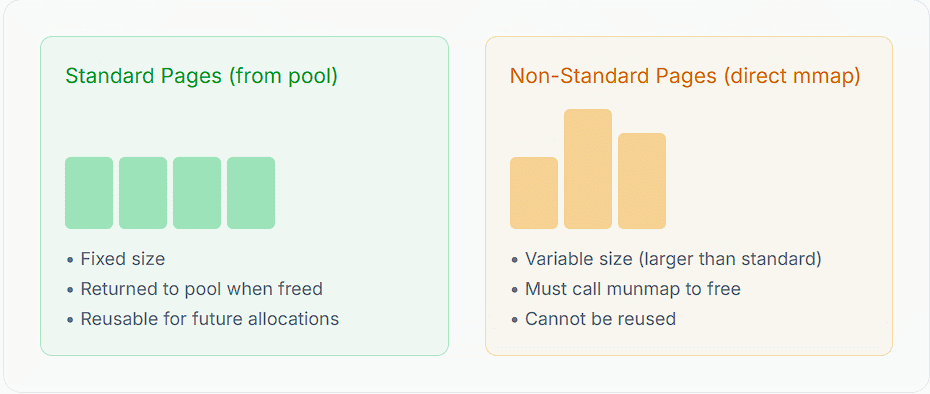
There is some very simple logic applied when 'releasing' a page.
- If the page is smaller than the standard size: return it to the pool
If the page is larger than the standard size, call munmap() to free the memory.
In other words, Ghostty's memory management works in a rational manner.
◆Scrollback limit optimization
To understand the background of the bug, we also need to know about 'scrollback.' Scrollback is a feature that allows you to view past output history in the terminal. Ghostty has a setting that limits scrollback by setting a history limit, and has a mechanism that deletes old pages when the limit is reached. However, when trying to process large amounts of data quickly, the scrollback limit is frequently reached, and deleting and adding pages is still a costly process even when using the memory pool. Therefore, when the limit is reached, the process is optimized by renaming the 'oldest page' in the page list to the 'newest page' and reusing it.

The scrollback limit optimization is very effective because it does not use any memory allocations and simply moves pages from the beginning of the page list to the end, or in programmatic terms, changes the pointer of a doubly linked list, consuming memory only to perform some metadata cleanup to clear the page contents.
◆Causes of memory leaks
When optimizing for scrollback limit, pages were always resized to the 'standard size'. However, at this time, the allocated size remained the same and only the size in the metadata was changed. Therefore, even if the allocated memory size was larger than the standard size, the size of the reused page was overwritten with the standard size, so the page list came to recognize it as the standard size.
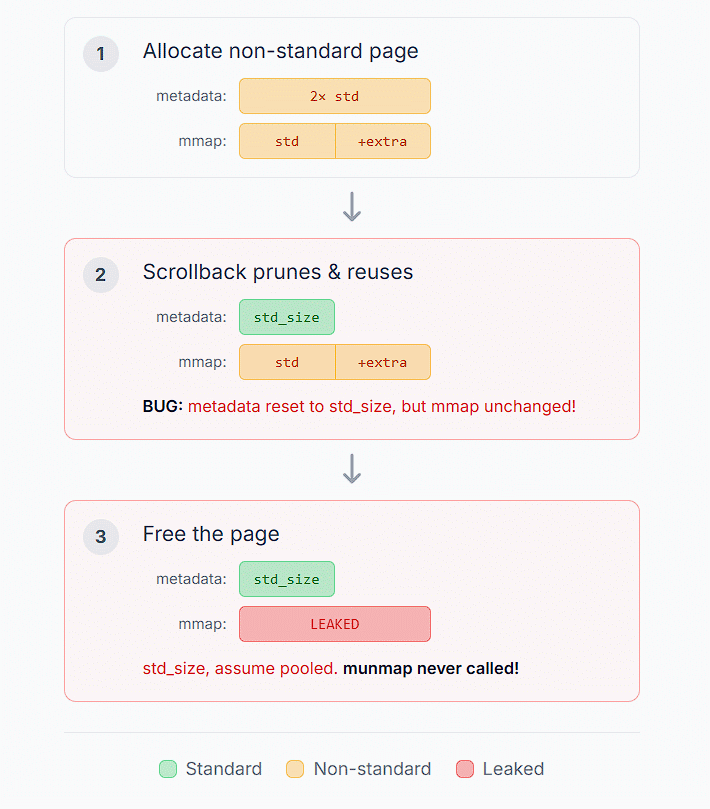
There are various situations in which page memory is released, the most common being when the user closes the terminal. When checking the memory size at that time, it was always the 'standard size,' so munmap(), which releases heap space, was not called. This is a typical memory leak pattern, and this was the root cause of the memory leak that occurred in Ghostty.
The problem was that the occurrence of 'non-standard pages' was a rare occurrence by design. Because the design and optimization of the page list assumed standard-sized pages, non-standard pages were limited to very specific scenarios, and the number of non-standard pages generated was small. However, the introduction of Claude Code changed the situation. Claude Code's CLI outputs a large number of multi-code point characters, which led Ghostty to frequently use non-standard pages. Furthermore, because Claude Code outputs a large amount of data to standard output, the scrollback limit was reached more frequently, resulting in an increased number of cases where non-standard pages were reused. This exposed a memory leak, and many users noticed abnormal memory consumption.
◆Solved
The solution is very simple: never reuse non-standard pages . When the scrollback limit is reached and a page is reused, the non-standard page always calls munmap() to free up memory and allocates a new standard-sized page. This completely fixed the memory leak in Ghostty. While we could have maintained a large memory size by reusing non-standard pages, given the original design philosophy of using standard pages, we decided that it would be more reasonable to continue the current operation and always revert pages to standard size unless we were faced with a case that could not be handled.
Related Posts:







in Software, Posted by log1c_sh