A security firm has reported a 'Pass-ta-key' attack method that exploits a vulnerability in Google Password Manager to bypass passkey authentication.

Palo Alto Networks' threat research division, Unit 42, has reported three attack methods that exploit implementation vulnerabilities in Google Password Manager's synchronized passkeys. If a victim's Windows PC is infected with malware, passkey authentication could be bypassed without the user's input, or all stored passkey private keys could be stolen.
Pass the Passkey: A Novel Attack Surface in Passwordless Authentication

Passkey is a system that allows users to log in to web services using fingerprint authentication, facial recognition, or a device PIN. It eliminates the need to enter difficult-to-remember passwords and is considered resistant to phishing attacks that trick users into entering their passwords on fake websites.
Using the Google Password Manager built into Google Chrome allows you to use your passkey from multiple devices logged in with the same Google account. While this is convenient because you can use a passkey created on your computer on your smartphone as well, the authentication process for sharing it across multiple devices becomes a new target for attacks.
All of the attacks reported by Unit 42 assume that the victim's Windows PC was already infected with malware. The attackers do not decipher the encryption used in the passkey, but rather mimic the authentication process performed by legitimate Google Chrome to proceed with the authentication procedure.
The series of attacks is called 'Pass-ta-key.' In a basic Pass-ta-key attack, a computer infected with malware performs the authentication process on behalf of the user. If the web service provider's identity verification is insufficient, it may be possible to log in from another device without fingerprint authentication or PIN entry.
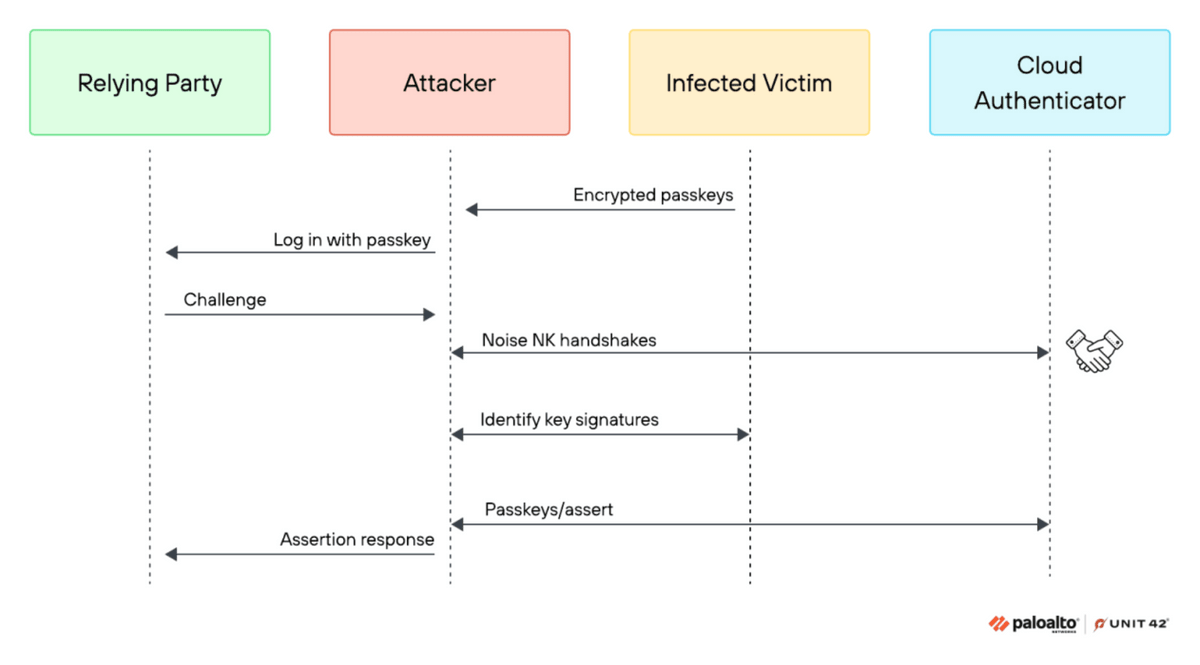
In Unit 42's testing, GitHub rejected the unauthorized login, but eBay was successful. This is because each web service uses different methods for verifying passkeys, resulting in the same attack succeeding or failing in different cases. eBay has since fixed the issue after receiving reports.
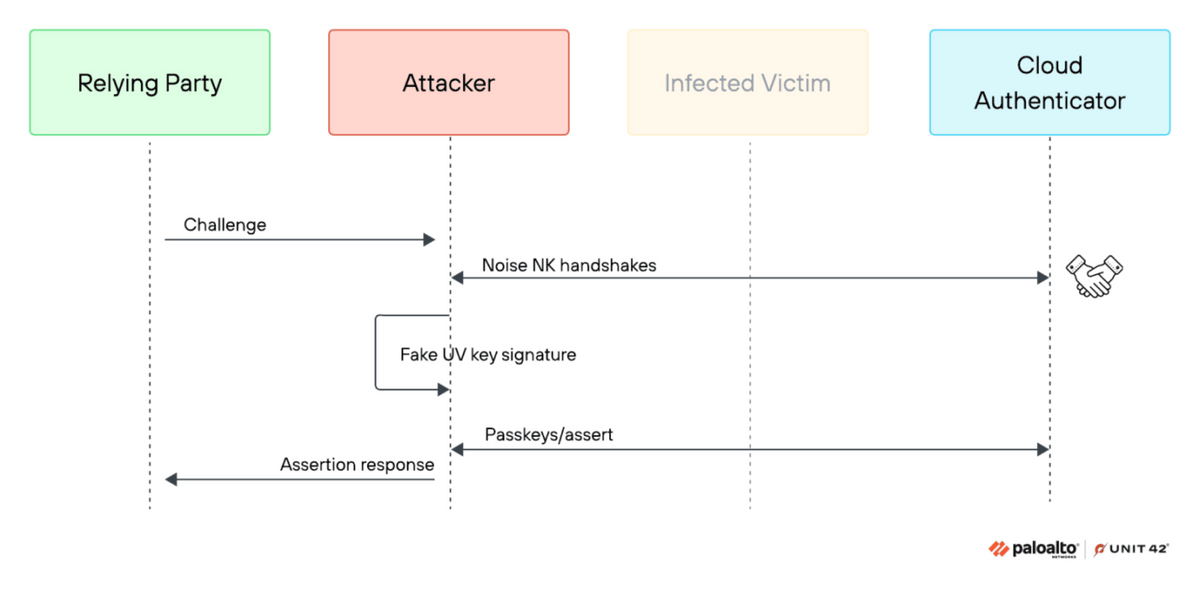
The more powerful 'Silver Pass-ta-key' attack exploits the re-registration process for devices using the passkey. Attackers register fraudulent authentication information so that the victim's device appears verified, allowing them to repeatedly log in without using the victim's computer. The device addition and recovery procedures, normally provided to maintain security, can become entry points that allow attackers to gain long-term access.
'Golden Pass-ta-key' is an attack that steals multiple saved passkeys at once. Although Google Password Manager stores passkeys in encrypted form, it has been found that critical information needed to decrypt them can potentially be read from Google Chrome's records and memory.
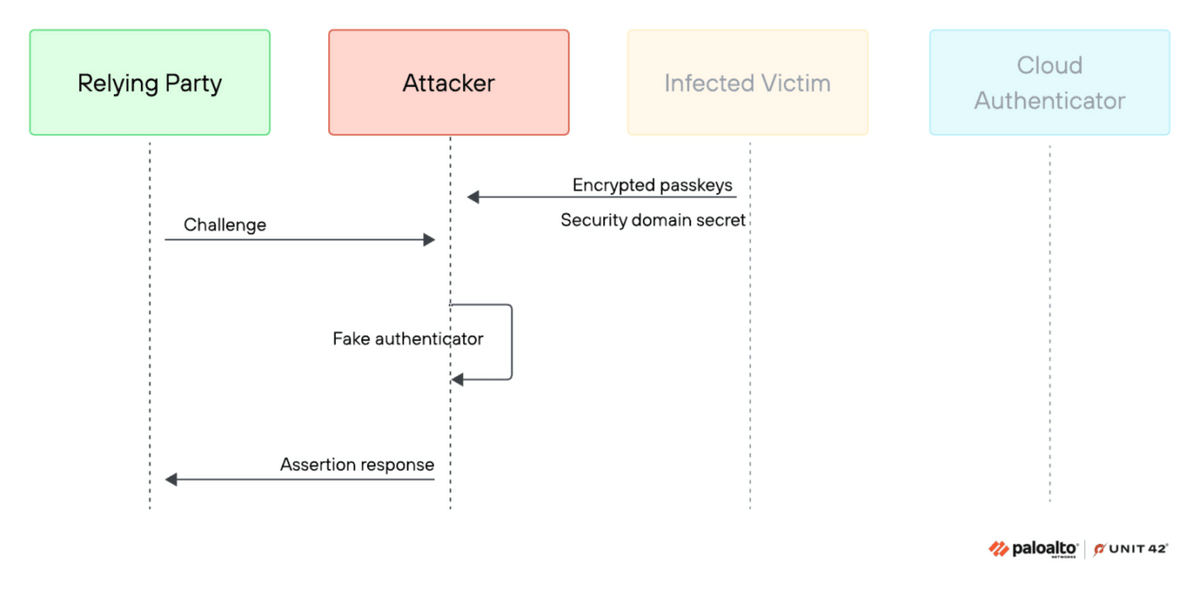
Following a report from Unit 42, Google has fixed the issue that was logging sensitive information. However, according to Unit 42, the same information is temporarily stored in memory when a device is re-registered, so the risk of malware reading it still remains.
Unit 42 also states that 'there is no need to prevent users from using passkeys.' Since the reported attacks require malware infection, basic malware countermeasures such as updating the OS and browser, not opening suspicious software or files, and not disabling security features are effective defenses.
On the other hand, Unit 42 points out that companies operating web services need measures to verify whether fingerprint authentication or PIN verification was actually performed when logging in with a passkey, and that businesses managing passkeys need mechanisms to prevent the registration of new devices and account recovery from being misused.
Unit 42 explains that passkeys remain a more secure authentication method than passwords, but states that as passkeys become more widespread, attackers will target not the passkey itself, but rather 'the procedure for determining which devices are safe to use with the passkey.'
Related Posts:





in Security, Posted by log1d_ts