An experiment suggests that lowering the resolution of images used for AI input can actually increase costs.
Many AI models are capable of image recognition. The idea of 'reducing the resolution of input images' has become widespread as a way to reduce the cost of the workflow for having AI recognize images, but
Choosing the Optimal Image Input Detail Level in LLMs — OpenRouter Blog
https://openrouter.ai/blog/insights/image-detail-low-cost/
OpenRouter investigated the impact of the 'detail' setting during image input on the accuracy and cost of using AI models, targeting five models: OpenAI's 'GPT-4.1,' 'GPT-5.4 mini,' and 'GPT-5.5,' and Google's 'Gemini 3.1 Pro' and 'Gemini 3.5 Flash.' While it's not possible to specify detail when using official web applications such as ChatGPT, you can set the resolution when feeding images to the AI when developing applications using the OpenAI API or OpenRouter.
The graphs below compare the scores on the MMMU-Pro Vision image recognition benchmark (1730 questions) when using 'low' (thin bars for low-resolution image input) and 'auto' (thick bars for automatic selection of appropriate resolution). In both cases, using 'auto' resulted in a higher accuracy rate.
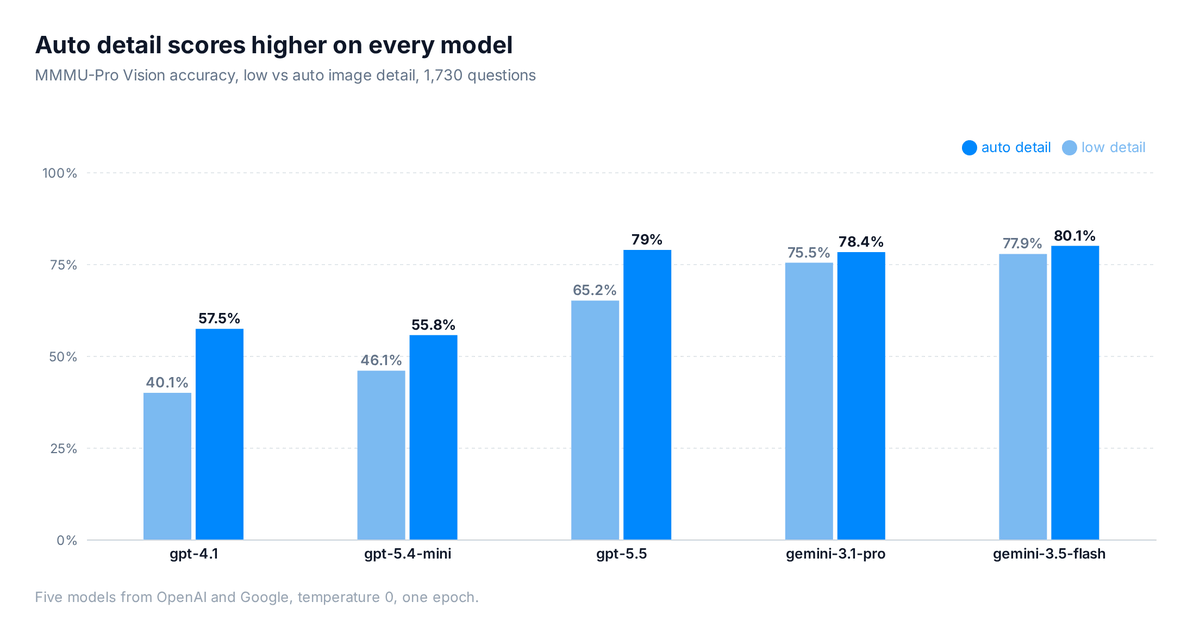
Even more interestingly, in GPT-5.5, the cost per question was 5.1 cents (approximately 8 yen) for 'low' and 4.5 cents (approximately 7.3 yen) for 'auto,' meaning 'low' was about 13% more expensive. In Gemini 3.5 Flash, 'low' was 2.96 cents (approximately 4.8 yen) and 'auto' was 2.80 cents (approximately 4.5 yen), with 'low' being slightly more expensive. In other words, there are cases where you think you're reducing processing costs at the expense of a lower score, but end up paying more.
OpenAI's documentation on image processing states that 'the low model is given a low-resolution image of 512x512 pixels, regardless of the original size, and is charged a small fixed token fee.' However, according to OpenRouter, when 'detail' is set to 'low,' the number of inference tokens increases to 1180, a 1.6-fold increase from the 730 tokens when set to 'auto.' OpenRouter speculates that this is because, since fine details in text and diagrams are lost in low-resolution images, many inference tokens are consumed in an attempt to understand small text and diagrams, resulting in an increased cost on the output side that exceeds the number of tokens saved in image input.
We benchmarked 1,730 visual reasoning questions across 5 models to test a common cost-saving trick: setting image detail to 'low.'
— OpenRouter (@OpenRouter) July 7, 2026
Surprise finding: it often backfires. The model burns extra reasoning tokens squinting at a blurry image, and overall cost increases 👇 pic.twitter.com/TBhfjdtXR7
On the other hand, for models without inference capabilities, the results were as expected: 'the accuracy rate decreases with the low setting, but the cost is reduced.' For example, with GPT-5.4 mini, setting it to 'low' reduced the cost per question by about 40% and improved the response speed, but the accuracy rate decreased from 55.8% to 46.1%.
OpenRouter concludes that, 'In inference models, setting the image resolution to 'auto' or 'high' and limiting the amount of inference rather than the image detail leads to significant cost savings than lowering the image resolution,' and that 'In non-inference models, setting it to 'low' can improve cost and response speed, but accuracy decreases with images containing a large amount of text.' However, OpenRouter advises that in any case, changing the image detail has only a limited impact on the cost, and the number of output tokens generated by the AI has a much greater impact on the final cost, so in most cases it is better to set the image detail setting to 'auto' and adjust the amount of inference.
Related Posts:


in AI, Posted by log1e_dh