Firefox 152 officially released, featuring a revamped settings screen and a function to mute all currently playing tabs at once.
The official version of the web browser ' Firefox 152 ' has been released. The Firefox settings screen has been significantly redesigned, making it easier to understand the categorization of items and navigate between screens. In addition, a feature has been added that temporarily disables tracker blocking for a specific tab if the site is not displaying correctly in private browsing, and a feature that mutes all tabs playing audio from the address bar.
Firefox 152.0, See All New Features, Updates and Fixes
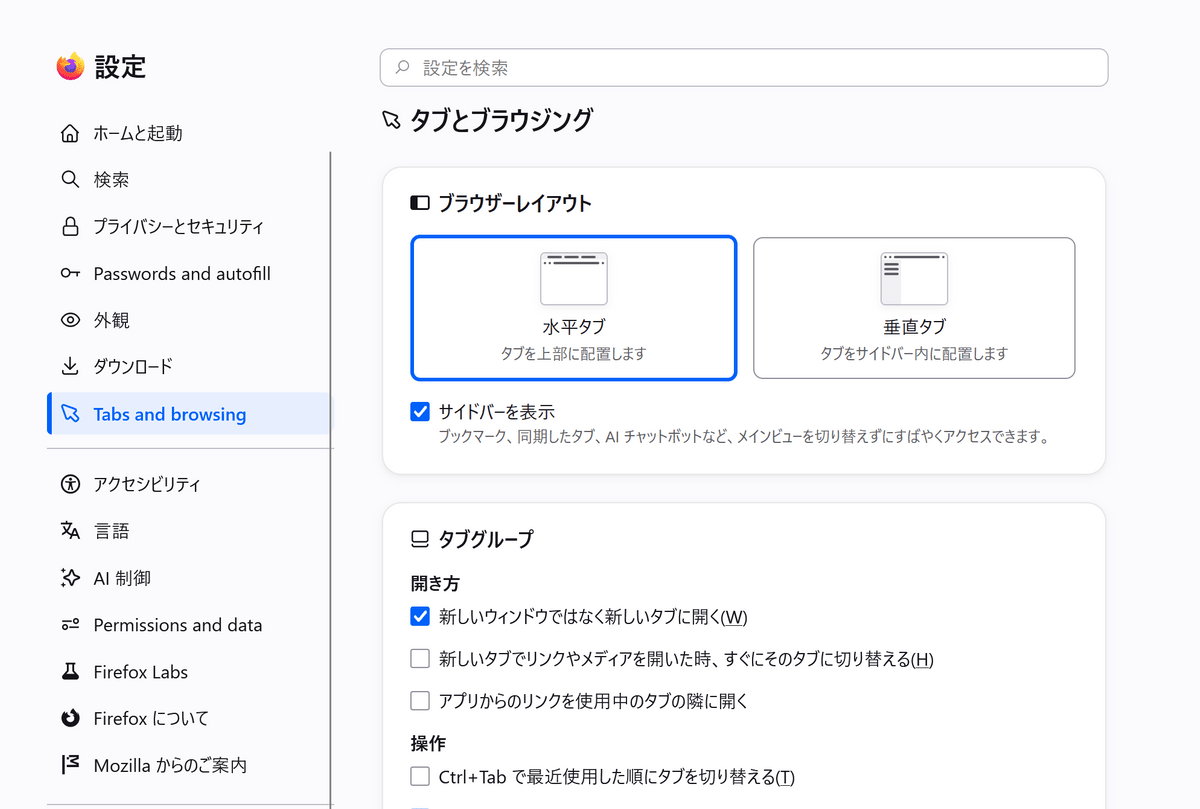
◆The settings screen design has been completely revamped.
Firefox's settings screen has been redesigned. The settings items are now more clearly organized and easier to understand, and customization has also been improved.
◆Private browsing allows temporary disabling of tracker blocking.
In private browsing, if a website stops working properly due to tracker blocking, you can now temporarily disable tracker blocking for the affected tab only.
If you reload a page that has blocked trackers, Firefox will display a message along the lines of 'Is the site not working properly?' and offer you the option to reload the page with temporarily reduced protection.
The temporary deactivation will only apply to the tab where the problem occurred; other tracking prevention features in Firefox will remain enabled.
◆ Mute all tabs at once from the address bar
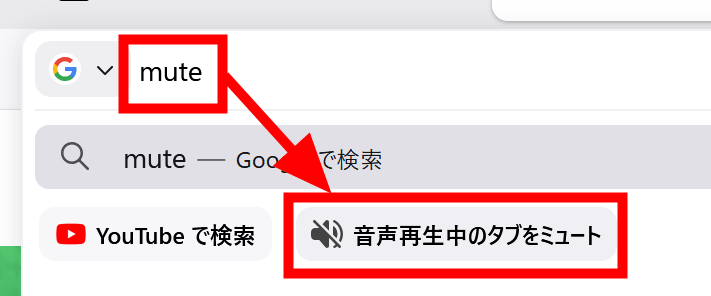
In Firefox 152, you can now mute all currently playing audio from the address bar, even if audio is playing from multiple windows or tabs.
To use it, simply type 'mute' in the address bar and select the quick action that appears. Typing 'shush' or 'sssh' will also display the mute quick action. Executing the quick action will mute all open windows in Firefox, specifically the tab currently playing audio.
◆ Copy tab links from the context menu
In the Windows and Linux versions, you can now copy URLs without switching tabs by right-clicking a tab and selecting 'Share' > 'Copy link'.
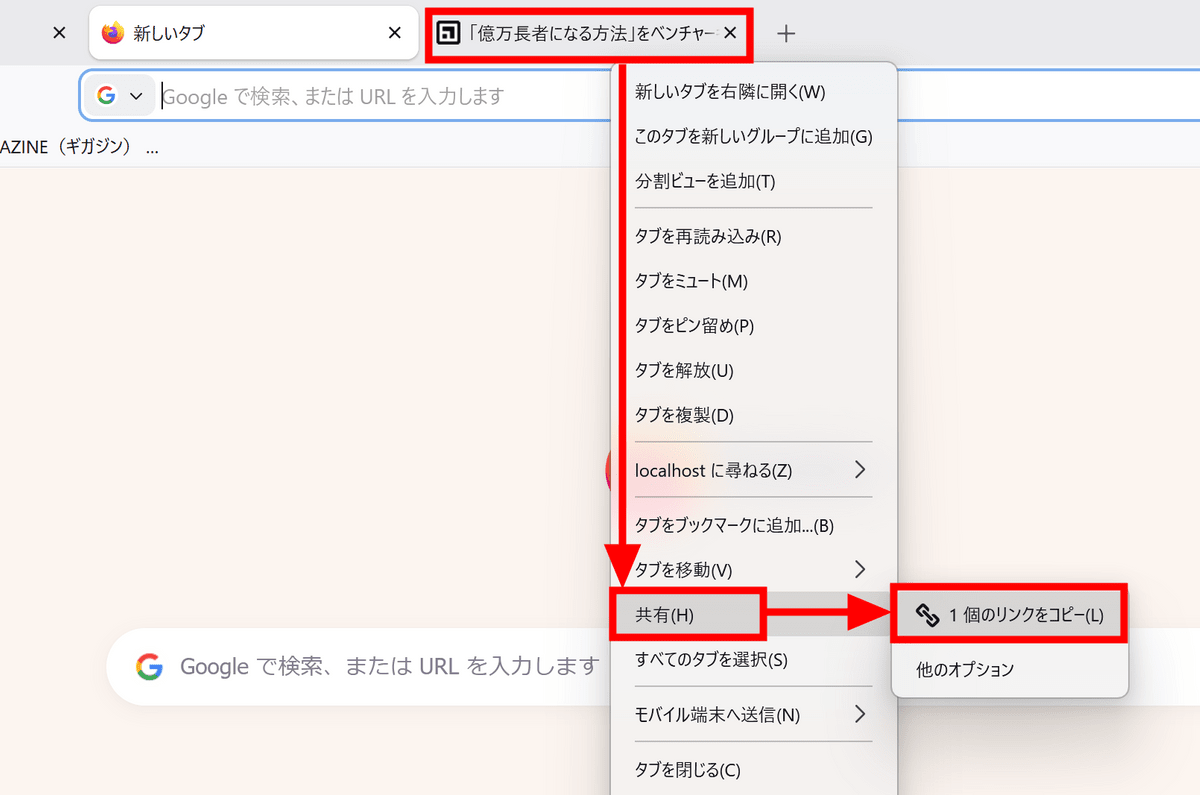
If you perform the same operation with multiple tabs selected, you can copy the URLs of all selected tabs at once. Note that in the Windows version, Microsoft's sharing function is still available from the 'Share' menu.
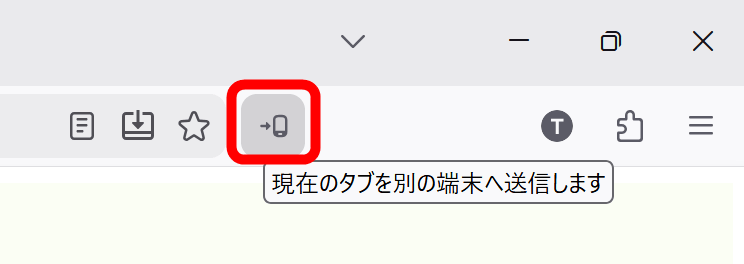
◆ The 'Send Tab' button can now be added to the toolbar.
Firefox now has a new 'Send tab' button on its toolbar. Clicking 'Send tab' allows you to send tabs to another device.
◆ Experimental support for JPEG XL images
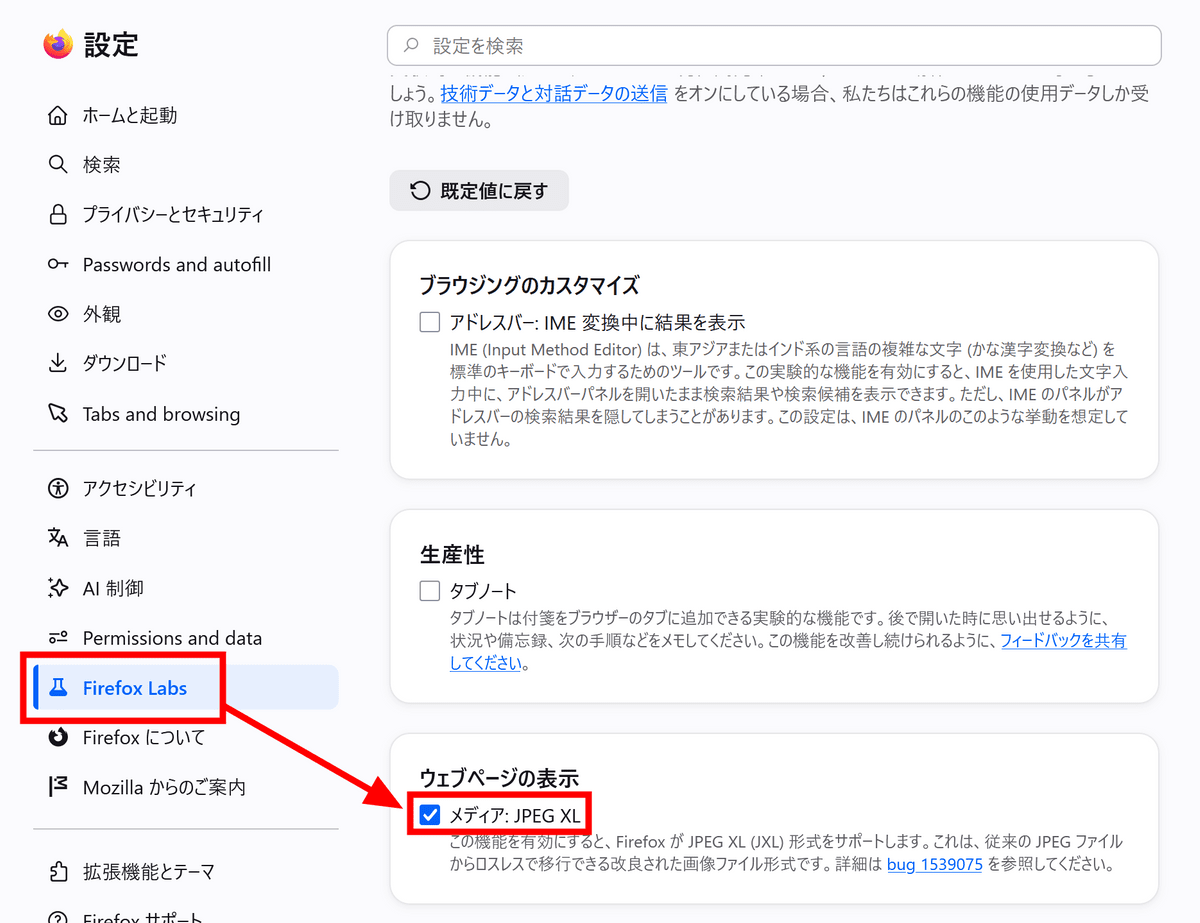
Firefox Labs has added experimental support for a new image format called 'JPEG XL.' JPEG XL is an image format being developed to achieve higher compression efficiency than existing formats such as JPEG, PNG, WebP, and GIF.
To enable JPEG XL, simply open 'Firefox Labs' in Firefox's settings and check the box next to 'Media: JPEG XL'.
◆ Added Basque and Galician to the translation function.
Firefox's built-in translation feature now supports Basque and Galician. Because Firefox's translation function performs the translation process on your device, it doesn't send page content to an external translation service.
◆Other updates
- Improved support for advanced cursor movement commands, such as moving based on paragraph boundaries, in the macOS version.
- Includes built-in spell-check dictionaries for Croatian, British English, Georgian, Persian, Slovenian, Tajik, Tamil, Tibetan, Turkish, Welsh, and Xhosa versions.
- The ability to zoom in and out of pages using the keyboard or mouse allows for finer increments of zoom magnification than before.
- When downloading files that Firefox displays directly, such as PDFs, is complete, if you have moved to another tab from the original page or closed the original tab, the file will now open in a background tab.
- Added the ability to open tabs from other devices as regular new tabs or new container tabs from the context menu under 'Tabs from other devices' in the sidebar.
- Fixed an issue where the 'Paste' option sometimes did not appear in the right-click menu on editing screens for Squarespace, LinkedIn, eBay, etc.
- Fixed an issue in the macOS version where images were not saved to the correct location when dragged from Firefox to the desktop or Finder.
- Fixed an issue where the 'About Firefox' window might not appear on the same display as the previously used Firefox window in a multi-monitor environment.
- Fixed an issue where cursor movement and word selection for right-to-left text were reversed between the macOS and Linux versions.
◆Updates for developers
- Added an option to the developer tools settings screen to toggle whether or not to display comment nodes in the inspector.
- Added support for the 'actions' option in Web Notifications, allowing action buttons to be displayed below the notification body, etc.
- Supports the CSS property ' field-sizing ' which allows you to adjust the size of form elements to fit their content.
- Supports 'WebAuthn Related Origin Requests' to make it easier to use the same passkey from multiple related domains.
- Added support for the 'unadjustedMovement' option of the Pointer Lock API, allowing websites to obtain raw mouse movement data that is not affected by the OS's mouse acceleration processing.
Additionally, Firefox 152 includes several security bug fixes .
The next major version, 'Firefox 153,' is scheduled for release on Tuesday, July 21, 2026 (local time).
Related Posts:






in Software, Posted by log1d_ts