ComfyUI now includes a memory optimization technology called 'Dynamic VRAM,' enabling faster generation even on PCs with limited RAM.
When running AI models for image or video generation locally, insufficient VRAM or RAM capacity is a major obstacle. ComfyUI, a node-based generation AI tool, enabled a new memory optimization feature called ' Dynamic VRAM ' by default in March 2026 to alleviate this problem, and a blog post explaining how it works was published on March 25, 2026.
Dynamic VRAM in ComfyUI: Saving Local Models from RAMmageddon

Dynamic Vram: the massive memory optimization is now enabled by default. · Comfy-Org/ComfyUI · Discussion #12699 · GitHub
https://github.com/Comfy-Org/ComfyUI/discussions/12699
Dynamic VRAM is a mechanism that copies the necessary parts of an AI model to the GPU's VRAM at the required time. Traditional memory management systems estimate the amount of memory needed in advance and allocate VRAM or RAM accordingly, but Dynamic VRAM can use memory more efficiently.
Dynamic VRAM offers several advantages, including 'reducing the amount of RAM used by the PC,' 'reducing the load on storage by creating fewer page files (swap files) when RAM is insufficient,' 'making it easier to avoid situations where processing stops due to insufficient memory,' and 'faster processing for loading AI models and applying LoRA.' On the other hand, GPU VRAM usage may increase compared to before, but ComfyUI explains that 'this is not an abnormality, but normal behavior that occurs because faster memory is being actively used.'
Dynamic VRAM doesn't copy data to memory when loading a model; instead, it records it as a pointer indicating the file's location. This allows for very fast model loading. Furthermore, because the model isn't directly copied, memory shortages are less likely to occur when loading multiple large models. Additionally, in environments with sufficient RAM, the model is cached in RAM, meaning that RAM usage may appear unchanged when viewed in Task Manager.
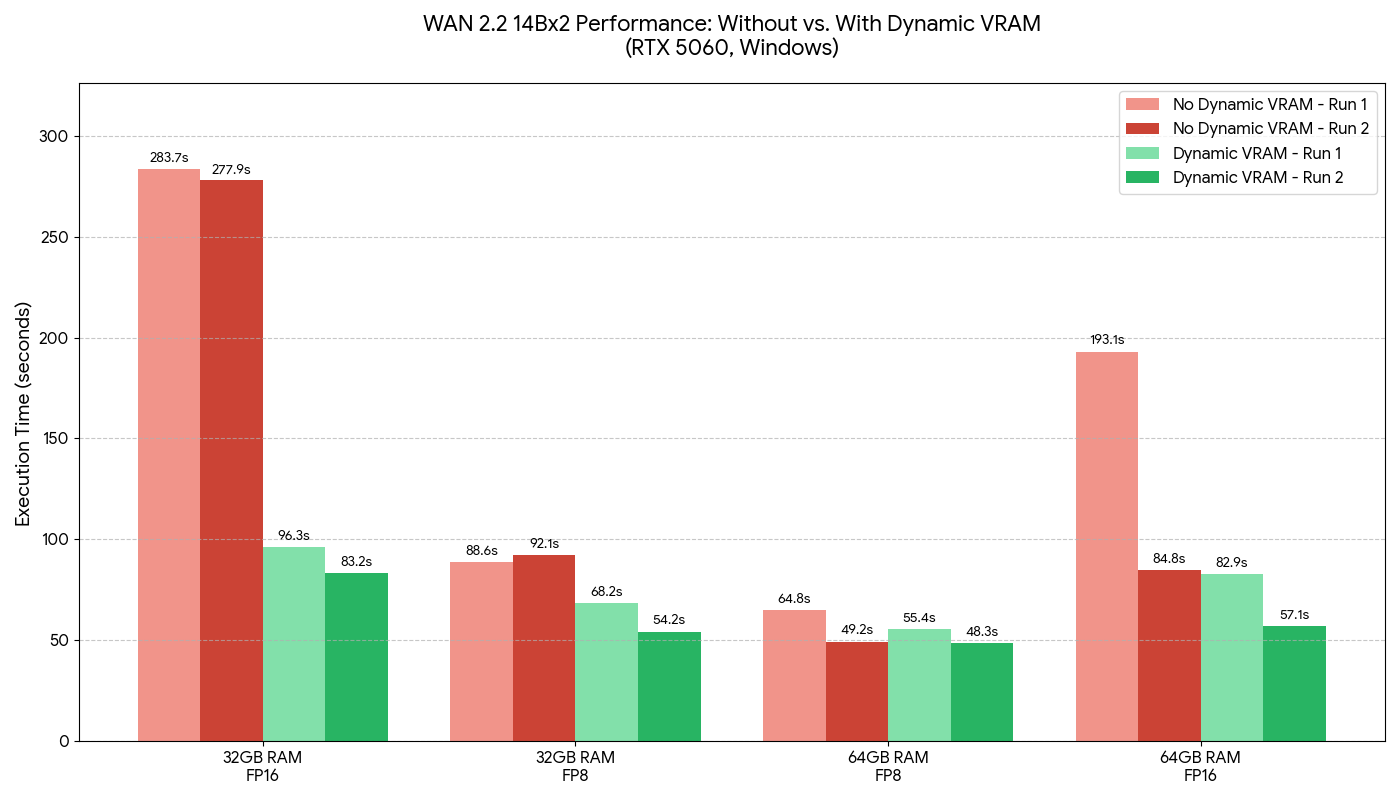
ComfyUI has also published benchmark results demonstrating the effectiveness of Dynamic VRAM. The following graph compares the time it takes to generate videos using Wan 2.2 on a PC equipped with an RTX 5060, with red representing the results when Dynamic VRAM is disabled and green representing the results when Dynamic VRAM is enabled. Under conditions where memory shortages are likely to occur, such as 'running the FP16 model on a PC with 32GB of RAM,' Dynamic VRAM achieves more than a three-fold speedup. Furthermore, under the condition of 'running the FP16 model on a PC with 64GB of RAM,' with Dynamic VRAM disabled, 'the first generation takes a long time, but subsequent generation can be done in less than half the time,' but with Dynamic VRAM enabled, the generation process is executed quickly from the very first attempt.
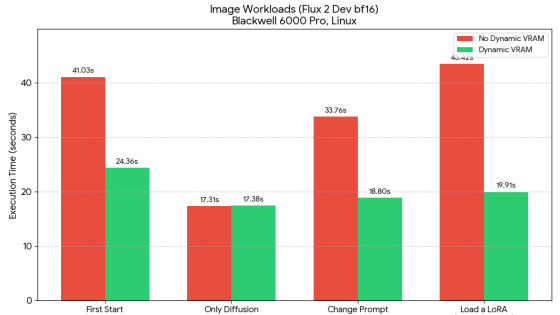
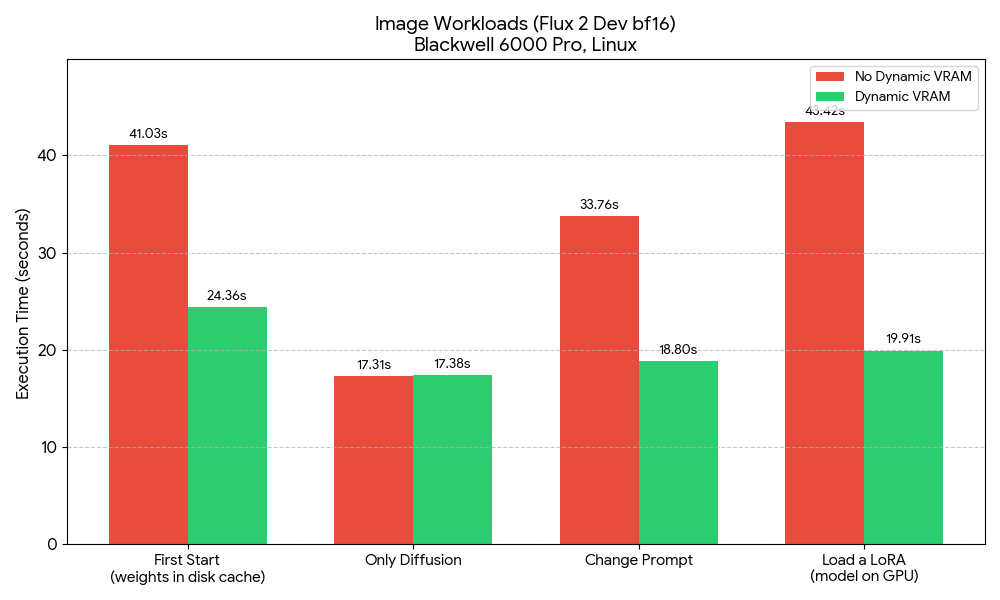
The graph below compares the time taken for image generation processing using Flux 2 Dev on PCs equipped with Blackwell 6000 Pro. Enabling Dynamic VRAM resulted in significant speed improvements in 'initial generation,' 'prompt change,' and 'LoRA loading.'
Please note that, as of the time of writing, Dynamic VRAM is only supported on Windows PCs and Linux PCs equipped with NVIDIA GPUs. The ComfyUI development team has indicated that they are working on further optimizations and support for AMD GPUs.
A lot more memory optimizations to come. Stay tuned. pic.twitter.com/swcrc5HuEg
— ComfyUI (@ComfyUI) March 26, 2026
Related Posts:







in AI, Web Service, Posted by log1b_ok