Windows drive letters can actually be anything other than A to Z
When talking about the Windows file system,
Windows drive letters are not limited to AZ - ryanliptak.com
https://www.ryanliptak.com/blog/windows-drive-letters-are-not-limited-to-az/
The easiest way to check that you can assign non-alphanumeric characters to drive letters is to use the subst command. For example, suppose you have a file called 'C:\foo\bar' and you run the following command in the command prompt:
[code]
subst +: C:\foo
[/code]
If the command is successful, 'C:\foo\' will now function as drive '+' and you will be able to access the '+:\' directory.
[code]
> cd /D +:\
+:\> tree .
Folder PATH listing
Volume serial number is 00000001 12AB:23BC
+:\
└───bar
[/code]
This alone is just trivia, but digging deeper into why this is possible will give you a better understanding of the inner workings of Windows.
First of all, it's important to understand what a drive letter is, because commonly known Windows paths are ' Win32 namespace paths .' In other words, paths like 'C:\foo' in the previous example are Win32 paths. However, low-level Windows NT APIs like NtCreateFile do not directly accept Win32 paths. Instead, they are passed an NT namespace path that has been converted by a high-level API like CreateFileW . While it is not possible to find out how the path was converted using only the standard mechanisms, it is possible to check by using an external command like NtTrace .
[code]
NtCreateFile( FileHandle=0x40c07ff640 [0xb8], DesiredAccess=SYNCHRONIZE|GENERIC_READ|0x80, ObjectAttributes='\??\C:\foo', IoStatusBlock=0x40c07ff648 [0/1], AllocationSize=null, FileAttributes=0, ShareAccess=7, CreateDisposition=1, CreateOptions=0x4000, EaBuffer=null, EaLength=0 ) => 0
NtClose( Handle=0xb8 ) => 0
[/code]
The above output shows that the Win32 namespace path 'C:\foo' is converted to the NT namespace path '\??\C:\foo' when passed to NtCreateFile.
To further explore the true nature of drive letters, we need to know about theObject Manager , which manages named objects in Windows and can be viewed using the WinObj tool .
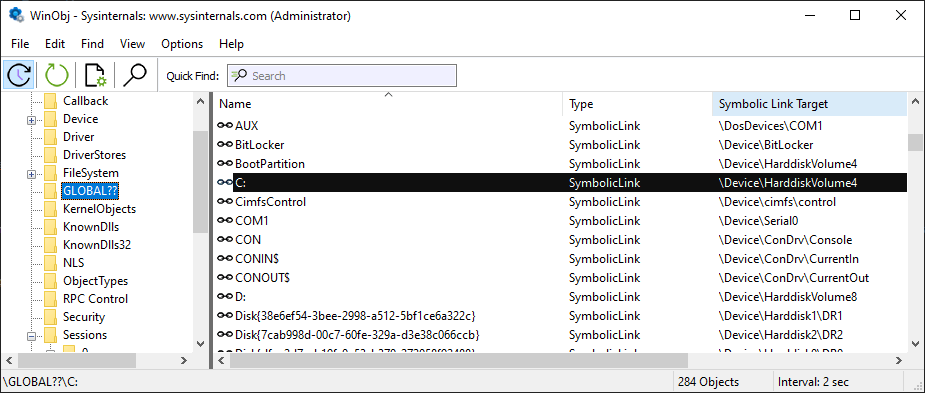
The '\??' portion of the NT namespace path '\??\C:\foo' is a special virtual folder managed by the Object Manager. In the above example, we can see that the object 'C:' is located in 'GLOBAL??' and is actually a device called '\Device\HarddiskVolume4'. In other words, in this case, '\??\C:\foo' is ultimately resolved as '\Device\HarddiskVolume4\foo'. It's important to note that the path '\??\C:\foo' is simply one way of referencing '\Device\HarddiskVolume4\foo'. For example, if a named object generated by a GUID such as 'Volume{18123456-abcd-efab-cdef-1234abcdabcd}' is a symbolic link to '\Device\HarddiskVolume4', then the path '\??\Volume{18123456-abcd-efab-cdef-1234abcdabcd}\foo' is equivalent to '\??\C:\foo'.
So essentially, there's nothing special about the object named 'C:' - it's just one of many symbolic links from the object manager's perspective .
Returning to the main topic, 'What are drive letters?', Ryan concludes that 'essentially they're just a convention that arose when converting Win32 paths to NT paths,' which is why 'C:\foo' and '+:\foo' behave exactly the same.
[code]
> paths.exe C:\foo
path type: .DriveAbsolute
nt path: \??\C:\foo
> paths.exe +:\foo
path type: .DriveAbsolute
nt path: \??\+:\foo
[/code]
However, some Windows components do not fully support flexibility regarding drive letters: for example, File Explorer cannot display drives with drive letters other than A to Z, and the same is true for PowerShell.
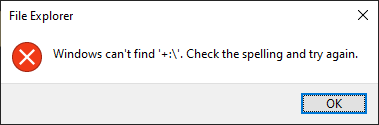
Also, not just any letter can be used as a drive letter. Non-ASCII characters can also be used as drive letters.
[code]
> subst €: C:\foo
> cd /D €:\
€:\> tree .
Folder PATH listing
Volume serial number is 000000DE 12AB:23BC
€:\
└───bar
[/code]
However, even non-ASCII characters are not case sensitive.
[code]
> subst Λ: C:\foo
> cd /D λ:\
λ:\> tree .
Folder PATH listing
Volume serial number is 000000DE 12AB:23BC
λ:\
└───bar
[/code]
Additionally, the characters that can be used are limited to 16-bit
It has been confirmed that the following problems occur when non-ASCII characters are used as drive letters.
If a program handles paths without using system APIs, it is highly likely that it will not recognize absolute paths with drive letters containing non-ASCII characters.
・Absolute paths are recognized differently depending on whether the encoding is WTF-16 or WTF-8.
-Due to a bug in the SetVolumeMountPointW API, the upper byte of the drive letter is truncated. For example, even if you create a mount point by specifying '€ (U+20AC)', it becomes '¬ (u+00AC)' when viewed in the WinObj tool.

Regarding these phenomena, Ryan says, 'It makes sense that non-ASCII drive letters are an edge case that no one has thought about.'
Related Posts:


in Software, Posted by log1c_sh