'@cloudflare/computer' has been introduced, assigning a dedicated computer to each AI agent, allowing file editing and command execution to be performed within a single work environment.

Cloudflare has announced '@cloudflare/computer,' an open-source library for AI agents. It provides a virtual working computer for each AI agent, complete with a file system and command execution environment, and is currently available as an early preview at the time of writing.
Your agent needs a computer, not a container — introducing @cloudflare/computer | The Cloudflare Blog
An AI agent that performs programming repeatedly reads source code, rewrites files, runs tests, reviews the results, and makes further corrections. Unlike chat AIs that only return text, it requires a place to save files in progress and an environment to run the program.
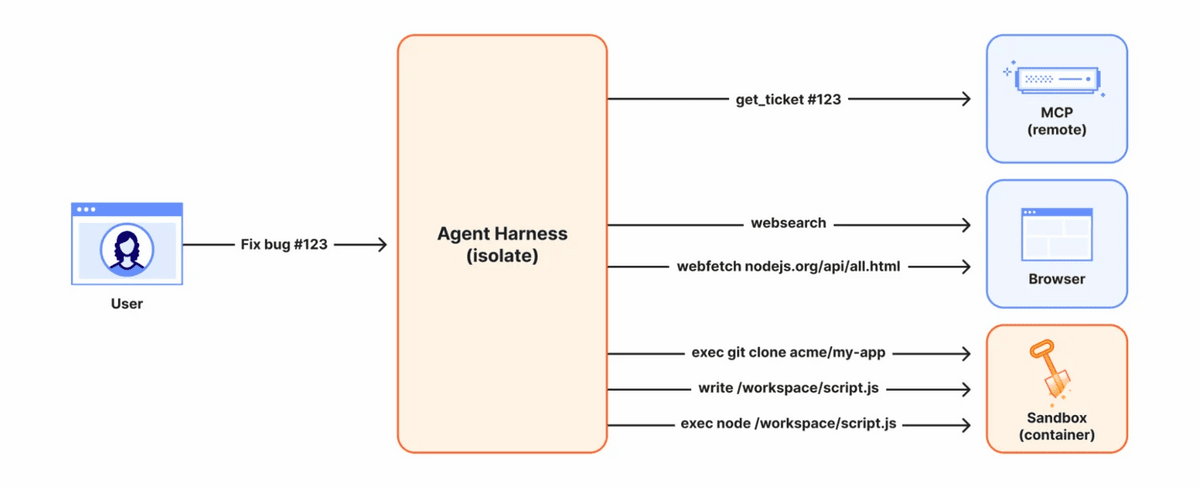
Containers are widely used as the execution environment for AI agents. While containers allow for the provision of isolated environments equipped with Linux and various tools, allocating a dedicated container to each user's AI agent at all times requires a large amount of CPU and memory. When running hundreds of millions to billions of AI agents simultaneously, the method of providing a container to every agent has limitations in scalability.
Cloudflare has long used 'Isolate,' a lightweight execution environment that can be started quickly, in Cloudflare Workers. Furthermore, a configuration exists where AI agent control processes run on Isolate, which can maintain state, and only processes requiring a Linux environment are sent to Cloudflare Containers. This allows for a balance between processing power and cost by handling light tasks with Isolate and calling containers only for heavy-load processes.
However, in traditional configurations, developers had to combine isolation and containers themselves, managing file transfers and the selection of execution environments. @cloudflare/computer is a library that hides the complex differences between underlying systems, allowing multiple execution environments to be treated as a single 'computer' by an AI agent.
When the AI agent executes a command, the AI model selects the appropriate execution environment based on the tool's description. Light tasks such as file editing, data processing, and Git repository operations are performed in isolation, while containers are used only when Linux, npm, or compiled executable files are required. Regardless of which environment is used, the same workspace files are used, and changes are synchronized.
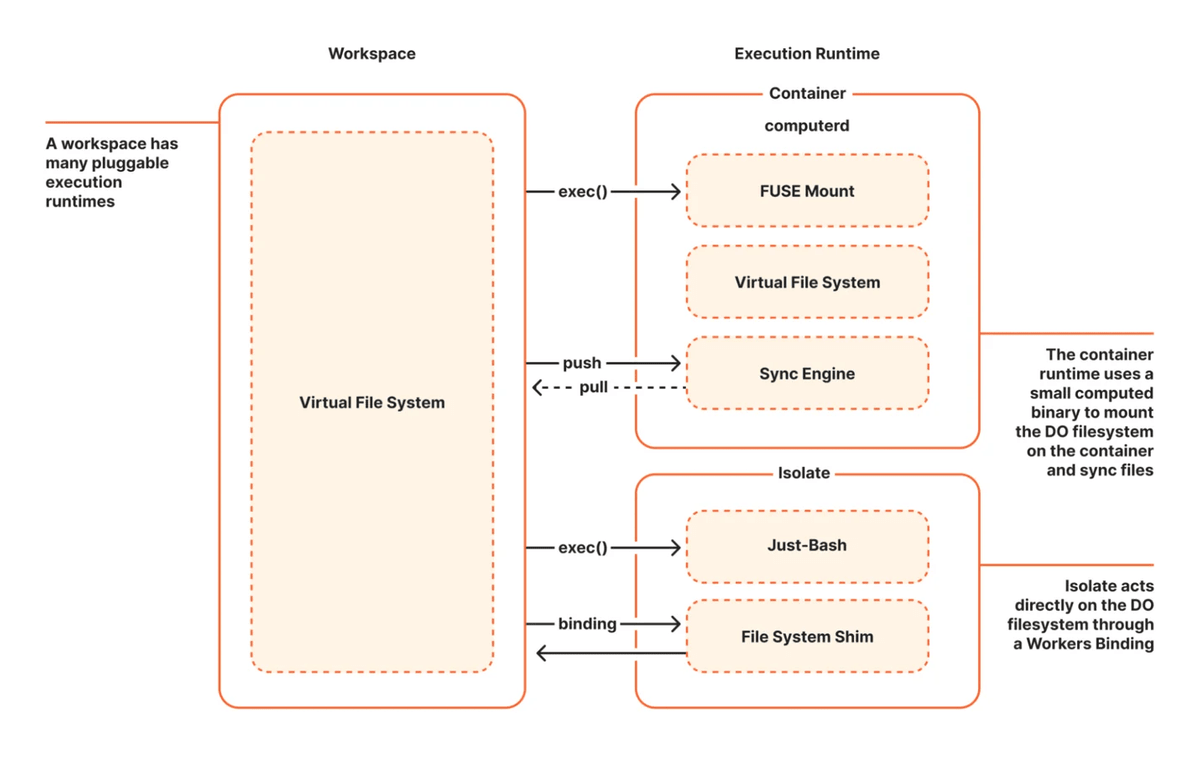
Furthermore, the system includes features to restrict the operations permitted to the AI agent and to record the tasks it has performed. This allows you to prevent unintended changes while running an AI agent that autonomously rewrites files, and to review the work performed afterward.
The diagram below summarizes Cloudflare's past, present, and future configurations. Previously, agent harnesses, configurations, and tools all ran in containers, but now agent harnesses run in isolation. In the future, the plan is to process configurations and lightweight tools in isolation as well, using containers only for necessary tools.
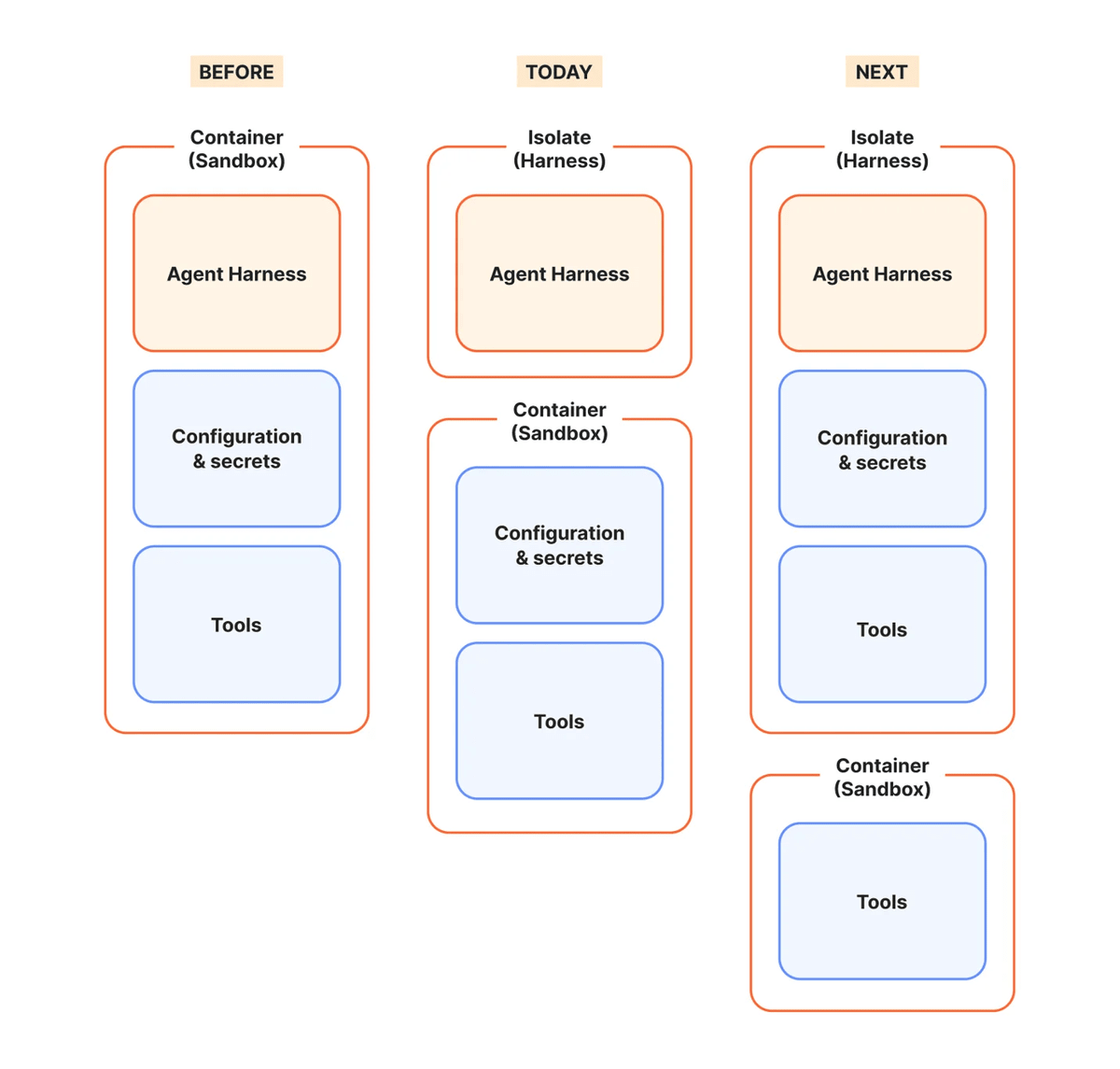
@cloudflare/computer is currently available as an early preview and can be installed via npm. The source code is publicly available on GitHub, but the API and design may change in the future, and its use in production environments is not recommended.
Cloudflare aims to run document creation, audio, and video processing in a lightweight 'isolated' environment in the future, and to reduce the percentage of AI agent tasks that require containers to less than 10%.
Related Posts:


in AI, Web Service, Posted by log1d_ts