Wayfinder automatically switches between local and cloud AI based on task difficulty, reducing costs by not using AI for the switching decision.
Wayfinder Router , an open-source tool available on GitHub, automates the decision-making process of assigning tasks like summarizing short texts and correcting typos to a small local AI, while sending complex reasoning and analyzing long code to a high-performance cloud AI.
GitHub - itsthelore/wayfinder-router: Simple CLI tool for deterministic routing of queries between local and hosted LLM models · GitHub
The required AI capabilities differ significantly depending on whether you're asking an AI chatbot to 'summarize this text in one sentence' or to design a program that meets multiple conditions. Sending even simple tasks to an expensive cloud AI every time will be costly, while entrusting complex tasks to a small local AI will result in lower response quality. Therefore, selecting the appropriate AI model is crucial.
While several routers and gateways already exist that switch AI models, Wayfinder emphasizes 'not using AI for distribution decisions.' Typical routers may call up classification models or LLM (Low-Level Module) judges to determine difficulty, but if this decision-making process incurs additional waiting time or costs, the mechanism intended to save energy becomes another burden.
By default, Wayfinder reads structural features such as prompt length, headings, lists, and the presence or absence of code, and calculates a complexity score from 0.0 to 1.0. Depending on the settings, it can also use mathematical terms, proofs, and words indicating strict constraints as criteria for evaluation. If the score is low, it is sent to the local model; if the score is high, it is sent to the cloud model. The evaluation is performed definitively offline, so the same input will produce the same result, and no API key or network connection is required for evaluation.
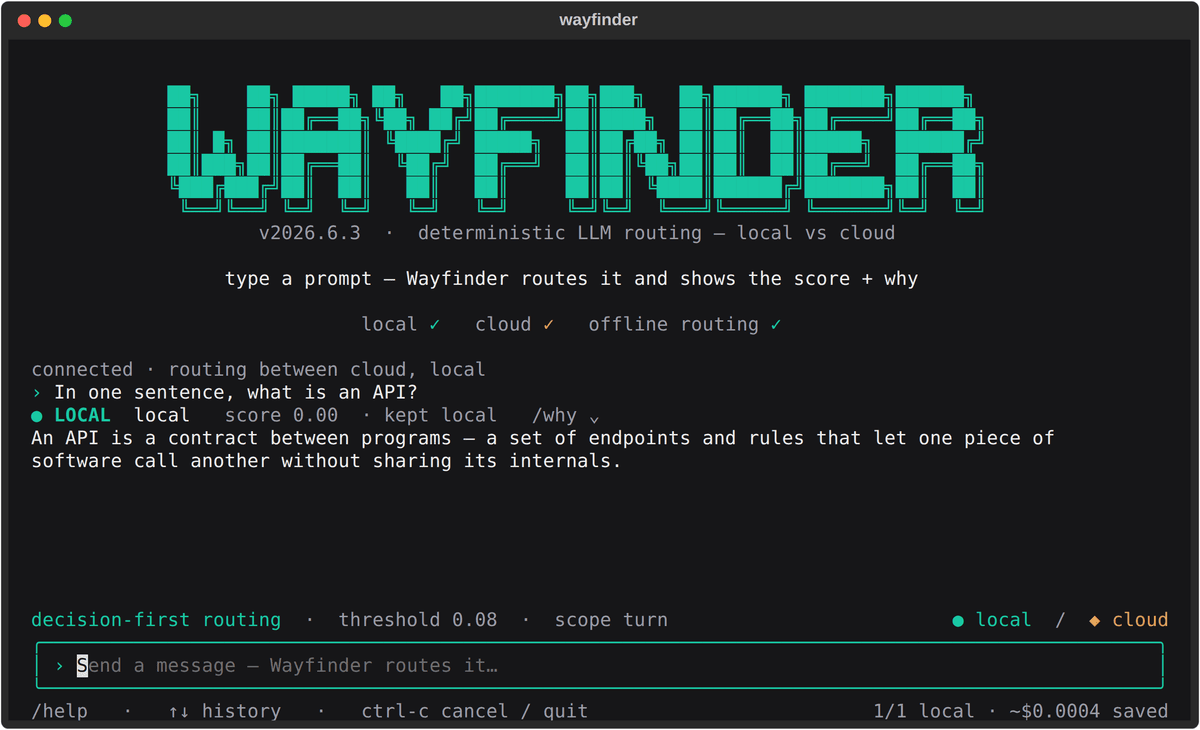
The implementation involves placing a Wayfinder gateway in front of your existing AI environment. It supports OpenAI-compatible APIs, and simply pointing the base_url of your connection destinations—such as chat UIs, IDE assistance tools, and agent frameworks—to Wayfinder automatically distributes tasks to the local or cloud models behind the scenes. From the user's perspective, even though they're asking questions on the same screen, behind the scenes, lighter questions are sent to local environments like Ollama and vLLM, while more complex questions are sent to the cloud AI.
Because it's difficult to manage if you don't know where the responses are being sent, Wayfinder adds a header to the responses indicating the routing model and complexity score. It's also possible to fix responses to local routes for a specific one-time event, prioritize the cloud, or change thresholds. Enabling slash instructions allows you to manipulate routing by writing instructions like '/local', '/cloud', or '/auto' at the beginning of the chat box.
Wayfinder is designed not only to use standard thresholds, but also to allow users to adjust them to their own usage patterns. For example, you can categorize your typical questions into those that were sufficient locally and those that required the cloud, and then use that data to adjust the thresholds. The local web UI allows you to view a breakdown of scores and see how adjusting the thresholds changes the sorting results.
The developers explain that Wayfinder 'allows you to avoid paying top-tier rates for summarization and typographical correction by assigning easy prompts to cheaper models and sending only difficult prompts to more expensive ones.'
Related Posts: