Humanizer, a skill for Claude Code and OpenCode, removes the artificiality from AI-generated text, making it more natural and human-like.
Since the advent of generative AI, it has become commonplace for AI to write text, and it is no longer unusual to see text generated by AI. However, even the most sophisticated AI-generated text can sometimes have an unmistakable 'AI feel.' Once readers become aware of the AI's presence, they tend to lose empathy for the text, which can ultimately damage their trust in the content itself. Now, a tool called ' Humanizer ' has emerged that thoroughly eliminates the 'quirks' of AI-generated text and transforms it into natural-sounding prose.
blader/humanizer: Claude Code skill that removes signs of AI-generated writing from text
◆Overview
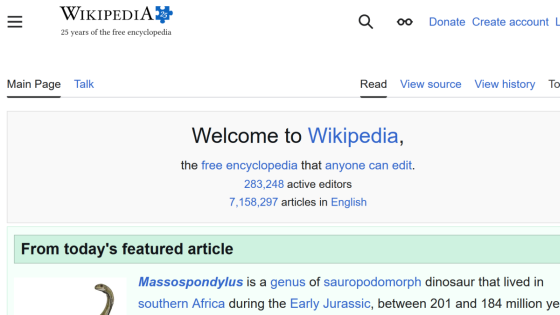
Humanizer is a 'skill' available for use with Claude Code and OpenCode, and its purpose is to detect, edit, and adjust the characteristics of AI-generated text. Based on Wikipedia's ' Signs of AI Writing ' guide, Humanizer detects 29 patterns that AI tends to generate and corrects them to make the text more natural. In addition, it has a 'voice calibration' function that allows the AI to learn and reproduce the writing style of a specific individual.
◆ Introduction
When using it with Claude Code, clone the repository directly into the skills directory.
[code]
mkdir -p ~/.claude/skills
git clone https://github.com/blader/humanizer.git ~/.claude/skills/humanizer
[code]
The same applies to OpenCode, except for the location of the skills directory.
[code]
mkdir -p ~/.config/opencode/skills
git clone https://github.com/blader/humanizer.git ~/.config/opencode/skills/humanizer
[code]
◆ How to use
To use Humanizer, follow these instructions:
[code]
/humanizer
[Paste AI-generated text here]
[code]
Alternatively, you can directly request a conversion using an AI model.
[code]
Please humanize this text: [Paste AI-generated text here]
[code]
◆Voice Calibration
If you are using 'voice calibration' to give your writing style individual characteristics, please follow these instructions:
[code]
/humanizer
Here's a sample of my writing for voice matching:
[Paste 2-3 paragraphs of text that highlight the individual's characteristics.]
Now humanize this text:
[Paste AI-generated text here]
[code]
◆Humanizer detection patterns
The following are some of the specific patterns that Humanizer detects.
● Content patterns
- Exaggeration of significance (e.g., 'evolution of...')
- A list of well-known names (e.g., 'cited in NYT, BBC, FT')
- A superficial analysis of '-ing' forms (e.g., 'symbolizing... reflecting... showcasing...')
- Promotional slogans (e.g., 'nestled within the breathtaking region')
- Ambiguous attribution (e.g., 'Experts believe...')
・Standard challenges (e.g. 'Despite challenges...continues to thrive')
● Language patterns
- AI-specific vocabulary (e.g., 'Actually,' 'additionally,' 'testament')
- Copula avoidance (e.g., 'serves as', 'features', 'boasts')
- Parallel structure of negation - Subsequent negation (e.g. 'It's not just X, it's Y' '..., no guessing')
- Syllogism (e.g., 'innovation, inspiration, and insights')
- Circular use of synonyms (e.g., 'protagonist,' 'main character,' 'central figure,' 'hero')
- Incorrect range (e.g., 'from the Big Bang to dark matter')
- Passive voice and fragments without a subject (e.g., 'No configuration file needed')
●Style Patterns
- Use of em dash (—) and end dash (–)
- Excessive use of bold text
- Inline header list (e.g., 'Performance: Performance Improved')
• Title case heading (e.g., 'Strategic Negotiations And Partnerships')
・Emojis (e.g., 🚀💡)
• Curly quotation marks ('')
- Excessive use of hyphenated word pairs (e.g., 'cross-functional,' 'data-driven,' 'client-facing')
• Persuasive rhetoric of authority (e.g., 'At its core, what matters is...')
- Announcements and instructions (e.g., 'Let's dive in,' 'Here's what you need to know')
- Fragmented headers (e.g., '## Performance' + 'Speed matters.')
- Difference notation (e.g., 'This function was added to replace...')
● Communication patterns
- Standard phrases specific to chatbots (e.g., 'I hope this helps! Let me know if...')
- Disclaimers that are cut off midway (e.g., 'While details are limited in available sources...')
- A flattering tone (e.g., 'Great question! You're absolutely right!')
●Standard phrases and disclaimers
- Fixed phrases (e.g., 'In order to,' 'Due to the fact that')
- Excessive cautionary remarks (e.g., 'could potentially possibly')
・General conclusion (e.g. “The future looks bright”)
◆Possibility of multilingual support
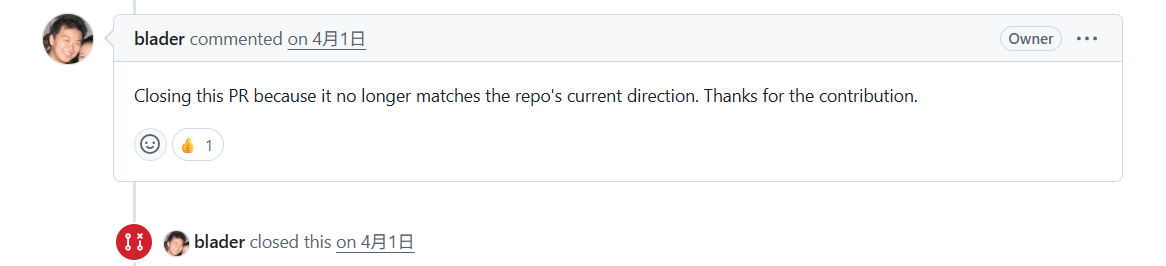
As you can see from looking at the 'detection patterns,' all patterns are based on English, and it's important to note that some, such as 'passive voice and fragments without subjects,' may not be directly applicable to Japanese. Checking the official GitHub Issues, I found that support for languages other than English had been discussed, but all were closed because they 'did not align with the direction of the repository.'
Regarding Japanese, the following repository inspired by Humanizer exists as of the time of writing this article.
gonta223/humanizer-ja: A Claude Code skill that converts AI-generated Japanese into human-written-sounding text. Includes a checklist of 20 patterns + a rewriting guide.
https://github.com/gonta223/humanizer-ja
Related Posts: