Google Chrome is being accused of secretly saving approximately 4GB of on-device AI models, and in some cases, they are re-downloaded even after being deleted.
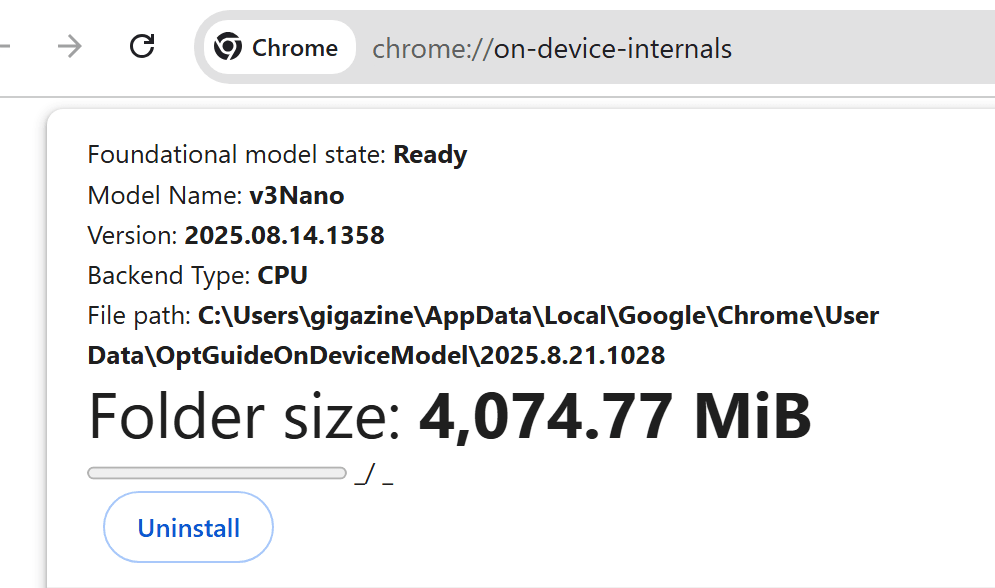
'Google Chrome is downloading approximately 4GB of on-device AI models to PCs without obtaining clear confirmation from the user,' says Alexander Hanff, a privacy audit expert.
Google Chrome silently installs a 4 GB AI model on your device without consent. At a billion-device scale the climate costs are insane. — That Privacy Guy!
https://www.thatprivacyguy.com/blog/chrome-silent-nano-install/
The file in question is named 'weights.bin' and is saved in a folder within the Chrome profile called 'OptGuideOnDeviceModel'. 'weights.bin' is the weight file for Google's on-device LLM 'Gemini Nano,' which is essentially the data for the AI model itself.
In May 2024, Google announcedits intention to integrate Gemini Nano into the Chrome desktop client starting with Chrome 126. Subsequently, with the release of Google Chrome 148 on May 5, 2026, the 'Prompt API' was introduced, allowing websites to directly access the browser's built-in on-device AI.
Google Chrome 148 stable version released, Gemini Nano integrated into the browser and usable from websites - GIGAZINE

On-device AI is a system that performs AI processing on the user's device without sending input data to the cloud. While this could potentially help protect privacy by not sending data to the cloud, Hanff is concerned that Chrome stores approximately 4GB of data for this purpose without clear notification or consent.
Gemini Nano is used for Chrome's AI features such as 'Help me write' and on-device fraud detection. However, Hanff points out that there is no clear option in Chrome's settings screen such as 'Download 4GB of AI models,' and that if the relevant AI features are enabled on a device with a certain level of performance, the download will proceed automatically in the background.
Furthermore, there have been reports of Chrome redownloading AI model files even after users have deleted them. To prevent this redownloading, it is necessary to disable on-device AI in Chrome's settings. Depending on the environment, instructions may also be provided to disable related features on the 'chrome://flags' page or to control them through enterprise policies. In any case, it's automatic to install but difficult to remove.
Mr. Hanff explains that when he created a new Chrome profile on an Apple Silicon-powered Mac, the AI model was saved without any human intervention. Examining the macOS file system event log, he found that the entire process, from folder creation to temporary folder deployment and final folder placement, took a total of 14 minutes and 28 seconds. During that time, there were no user clicks or inputs.
Furthermore, it appears that Chrome's internal state files contained evidence of it determining whether a device was eligible for model distribution based on its GPU, memory, and other performance factors. Hanff criticizes Chrome for treating users' devices as 'eligible for AI model distribution' and for starting the download before users can understand the functionality through the settings screen.
Hanff also points out that a particularly confusing point is that the 'AI mode' prominently displayed in Chrome is different from the local model. Users tend to think that AI mode is processed by Gemini Nano stored on the device, but AI mode is a cloud-based AI search function that sends queries to Google's servers. On the other hand, the local Gemini Nano is used for relatively inconspicuous functions such as text creation assistance and tab group suggestions.
Google Search's 'AI Mode' is now available in Japanese - GIGAZINE

In other words, despite users bearing the burden of 4GB of storage space and download bandwidth, the most noticeable AI experience isn't on-device processing. Hanff sees this as 'not so much for the user's benefit, but rather Google pre-loading assets onto user devices in preparation for future AI feature deployments.'
Legally, Hanff points out that this could violate the EU's ePrivacy Directive and GDPR. He argues that storing information on a user's device generally requires explicit prior consent, and that a 4GB AI model is not essential for normal Chrome usage. He also points out that the method of determining who receives the model based on device performance could violate principles of transparency and data minimization.
The environmental impact cannot be ignored. According to Mr. Hanff's calculations, distributing a 4GB model to 100 million devices would result in 6,000 tons of CO2e emissions, 500 million devices would amount to 30,000 tons of CO2e, and 1 billion devices would amount to 60,000 tons of CO2e. These figures are for a single distribution only and do not include re-downloads after deletion, future model updates, or the electricity required to actually run the AI.
Hanff suggests that Google should have explicitly asked 'Do you want to save the 4GB AI model?' before downloading, downloaded the model only when the user first uses the AI feature, and provided buttons in the settings screen for model size, purpose, deletion, and stopping re-downloads.
The core of this issue is that AI models cannot be given special treatment simply because they are AI models. Users' devices are personal devices that should be managed by their owners, not corporate distribution infrastructure. Even a 4GB file per device for a massive software like Chrome has a significant impact on overall bandwidth, power consumption, CO2 emissions, and user trust. Hanff concludes that whether Google changes this behavior to an explicit opt-in system in the future will be a test of its commitment to 'responsible AI.'
Related Posts: