Google Chrome 153 stable version released, includes 'dedicated HTML elements for camera and microphone,' 'addition of Iterator.zip(),' and 'Rust-based partial XML parsing.'
The latest stable version of the web browser 'Google Chrome,' version 153, has been released. New HTML elements specifically for accessing the camera and microphone have been added, and features such as 'Iterator.zip()' for processing multiple iterators at once are now available. Additionally, some XML parsing processes have been replaced with Rust-based parsers for enhanced security.
New in Chrome 153 | Blog | Chrome for Developers
Chrome 153 | Release notes | Chrome for Developers
https://developer.chrome.com/release-notes/153
◆ Dedicated HTML elements for camera and microphone have been added.
Chrome 153 adds the new `<camera>` and `<microphone>` elements. These HTML elements are used to request video from a webpage via the camera and audio from a microphone, respectively. While Chrome 151 introduced the `<usermedia>` element which could handle both the camera and microphone, `<camera>` and `<microphone>` are specifically designed for situations where you only want to use a single function.
When these elements are placed, a dedicated UI managed by the browser appears within the web page. The user must explicitly click this UI before permission confirmation and streaming begin, and because the browser strictly manages the style, the website cannot freely change its appearance. This allows for simpler implementation of web apps that only require a camera or only a microphone, while maintaining the same security model and permission recovery functionality as <usermedia>.
◆The 'Iterator.zip()' function, which combines multiple iterators, is now available.
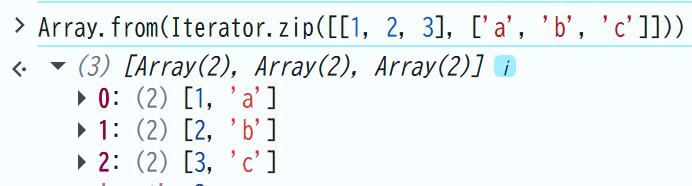
Chrome 153 adds support for 'Joint Iteration,' which allows you to advance multiple iterators simultaneously in JavaScript and retrieve values together. The `Iterator.zip()` and `Iterator.zipKeyed()` methods have been added. For example, passing multiple Iterable objects to `Iterator.zip()` in an array will create a new iterator that combines the values at the same position in each object into a single array. By default, the process terminates when the shortest iterator finishes.
Additionally, the behavior can be changed using the 'mode' option. In 'shortest' mode, it stops when any iterator finishes, while in 'longest' mode, it continues until all iterators have finished, and any missing iterators are filled with 'undefined' by default. In 'strict' mode, a TypeError is raised if the lengths of each iterator do not match. With 'Iterator.zipKeyed()', you can obtain values as a keyed object instead of an array.
Furthermore, `Iterator.prototype.join()` has been added, which concatenates the values returned by an iterator into a single string. Similar to `Array.prototype.join()` which can be used with arrays, it allows you to combine the contents of an iterator into a single string using any delimiter such as a comma or hyphen.

◆Replacing part of the XML parsing with a Rust-based parser
In Chrome 153, some XML parsing processes have been replaced with memory-safe Rust implementations to protect users from memory-related vulnerabilities. The new parser is used in cases that do not require XSLT, specifically when accessing the 'DOMParser' Web API, the 'responseXML' of XMLHttpRequest, when directly opening SVG files, and when loading SVG images as external resources.
Chrome is also moving towards deprecating and removing XSLT itself, with the aim of reducing the risk of bugs that could lead to memory corruption in XML processing that does not use XSLT, while maintaining compatibility with existing web standards.
◆ 'scroll-axis-lock' controls diagonal scrolling.
Chrome 153 added the CSS property 'scroll-axis-lock'. In most browsers, when a user starts scrolling, if the amount of movement is large in the vertical or horizontal direction, the scroll may be fixed to that direction only. This mechanism is intended to prevent unintended horizontal movement, but it can be a hindrance for content that you want to scroll freely diagonally.
Using `scroll-axis-lock` allows you to specify that the browser should not lock the scroll direction, making it easier to implement UIs that always scroll diagonally.
◆Supports spatial audio format 'IAMF'
Chrome 153 now supports decoding and playback of 'Immersive Audio Model and Formats (IAMF)'. IAMF containers can be played from HTML media elements via Media Source Extensions (MSE).
IAMF is an open, royalty-free spatial audio format that supports channel-based, scene-based, and object-based audio representations. It makes it easier for web developers to deliver immersive audio experiences across various devices without relying on proprietary formats or complex channel control using JavaScript.

◆Other updates
- The 'renderSizeHint' property will be added to the 'AudioContext' and 'OfflineAudioContext' properties of WebAudio.
You can now specify the number of frames to render at once during audio processing. Omitting 'renderSizeHint' or specifying 'default' will result in 128 frames as before, while 'hardware' will allow the browser to select an appropriate size based on your hardware.
- The 'buffer_view' feature will be added to WGSL for WebGPU.
You can split a single uniform, storage, or workgroup variable into multiple logical variables, or interpret stored data as multiple types within a program.
- Improved interoperability
The timing of the CSS animation 'transitionrun' event and the media query 'change' event has been changed to conform to the HTML specification, improving interoperability with Firefox's Gecko and Safari's WebKit.
◆Origin Trial
Chrome 153 is currently running an origin trial for 'JavaScript Self-Profiling Markers'.
The JavaScript Self-Profiling API is an API for measuring performance by sampling the call stack of a web application itself in a real user environment. With this new feature, an optional 'marker' field has been added to each sample, allowing you to identify which browser process—'script,' 'gc,' 'style,' 'layout,' 'paint,' or 'other'—was being executed.
Previously, even if there was a gap between JavaScript stacks, it was sometimes difficult to determine what was happening at that time. However, markers make it easier to analyze what time was spent on garbage collection, style recalculation, layout, rendering, etc.
◆Privacy Sandbox-related APIs and other services will be deprecated or removed.
The Chrome 153 release notes indicate that several Privacy Sandbox-related APIs are scheduled for deprecation and removal.
The APIs affected are the 'Protected Audience API' which displays ads based on interest groups, 'Related Website Sets (RWS)' which declares relationships between multiple sites, the 'Shared Storage API' which provides cross-site storage, 'document.requestStorageAccessFor' which requests storage access between RWS sites, and the 'Attribution Reporting API' which measures ad conversions. Following Google's decision to maintain its traditional approach to third-party cookies, these functions are scheduled to be deprecated or removed.
Additionally, Blink's proprietary navigation target, '_current,' was removed in Chrome 153. Apparently, _current was not a web standard and had very low usage.
As announced in March 2026, Chrome has shortened its stable release cycle starting with version 153, and is now releasing a new beta and stable version every two weeks as a general rule. The next stable version, 'Google Chrome 154,' is scheduled for release on September 22, 2026, local time.
Google shortens Chrome's release cycle from 4 weeks to 2 weeks - GIGAZINE

Related Posts:




in Software, Posted by log1d_ts