WordPress.com has announced that it will officially support features such as content creation, SEO optimization, comment management, and metadata updates powered by an AI agent.

Automattic has announced that it will implement a posting feature that will enable AI to create posts for its hosting blog service, WordPress.com.
AI agents can now create and manage content on WordPress.com
WordPress.com implemented support for MCP (Model Context Protocol) in October 2025, primarily enabling 'reading' capabilities such as content analysis by AI agents.
On March 20, 2026, WordPress.com added a new 'Write' feature, enabling multiple operations such as content creation by an AI agent, comment approval and reply, and updating metadata like alt text for images.

As shown below, simply give instructions in natural language, and AI agents connected to WordPress.com, such as Claude, Cursor, and ChatGPT, will handle the processing for you.
'I've finished writing this post. Please publish it as a draft, categorize it under 'Travel,' add relevant tags, and write a meta description of 160 characters or less.'
'I'd like to start sharing recipes on my blog. Please create a 'Recipes' category and set up subcategories for breakfast, lunch, dinner, and dessert.'
'Please create an About page that includes sections for team, mission, and contact information.'
'Please approve all pending comments on your latest post and reply to any comments asking about pricing.'
'Audit the website's accessibility and create a report.'
'Find all images in the media library that do not have alt text and make suggestions based on their filenames and attachments.'

The AI agent is designed to prompt for confirmation at every step before making any changes. Several safety measures are in place, such as all new posts being saved as drafts by default and all changes being viewable in the activity log. The AI agent also reads the site's theme and adapts its actions accordingly.
The writing feature is available with all paid WordPress.com plans.
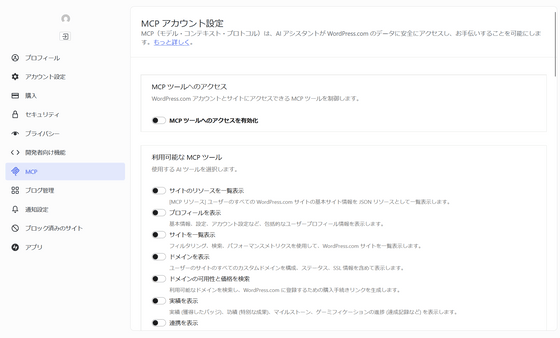
You can start using it by accessing the following MCP account settings page and turning on 'Enable access to MCP account settings page tools'.
Model Context Protocol (MCP) account settings — WordPress.com
Related Posts:



in Web Service, Posted by log1p_kr