A study revealed that Google Safe Browsing in Chrome failed to detect 84% of phishing sites.
Google Safe Browsing is a Chrome feature designed to protect users from malware, malicious websites, phishing scams, malicious ads, and social engineering attacks. The level of protection can be adjusted in Chrome's settings. However, cybersecurity firm Norn Labs has reported that Google Safe Browsing failed to detect approximately 84% of phishing sites.
Huginn Report: February 2026 | Norn Labs
https://www.norn-labs.com/blog/huginn-report-feb-2026
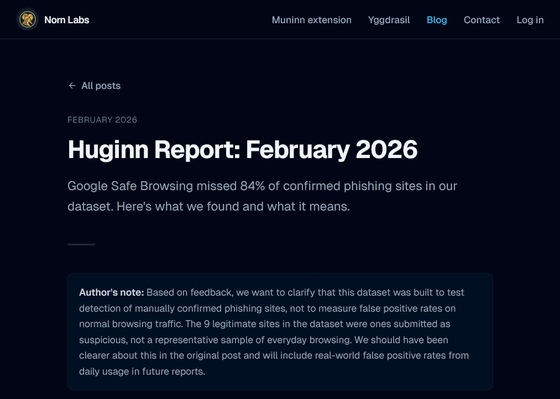
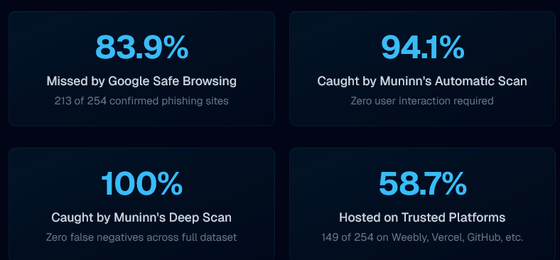
Norn Labs has released its February 2026 report on its phishing detection tool, Huginn. According to the report, Huginn identified 254 phishing sites that month, but when they checked whether Google Safe Browsing had flagged each URL as dangerous, only 41 out of 254 sites received a warning from Google Safe Browsing. From this result, Norn Labs concludes that 83.9% of the phishing sites detected by Huginn were missed by Google Safe Browsing. On the other hand, Norn Labs boasts that its Chrome extension, Muninn, detected 94.1% of phishing sites, and that it could capture 100% using its 'Deep Scan' feature.
According to Norn Labs, this stems from a structural limitation of Google Safe Browsing. Because Google Safe Browsing requires phishing site URLs to be identified and added to a blocklist in order to protect users, it is vulnerable to new attacks and phishing sites hosted on trusted platforms, especially those using evasion techniques such as one-time tokens and bot detection. Blocklist-based detection is purely reactive, and in many cases, the fraud has already occurred by the time the protection is activated.
The report also reveals how many phishing sites are hosted on 'platforms that many people consider trustworthy.' Of the 254 phishing sites identified, 149 were hosted on well-known, legitimate platforms. Because many legitimate sites reside on these domains, they cannot be simply blocked, which is one reason why Google Safe Browsing is not working effectively. Below is an example of trusted platforms hosting phishing sites, as shown by Norn Labs. In the graph, red represents phishing sites that were not flagged by Google Safe Browsing, and green represents flagged sites, showing that the majority were not detected.
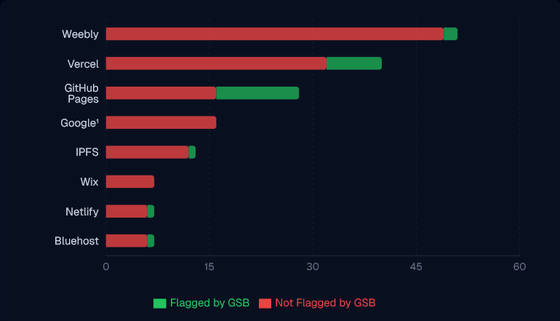
Furthermore, there have been cases where Google's own services were being used to host phishing attacks. Norn Labs states, 'Google is literally hosting phishing attacks on its own infrastructure and failing to detect them with its own detection tools.'
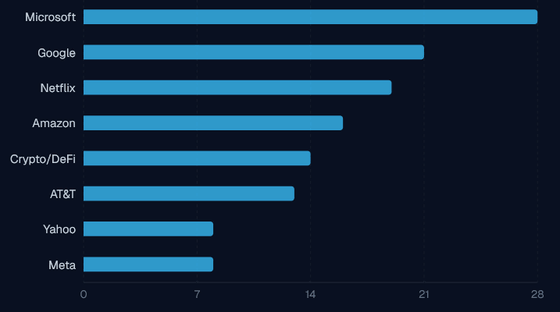
The following graph shows the brands that phishing attackers have impersonated. Microsoft was the most frequently used with 28 cases, followed by Google with 21, Netflix with 19, Amazon with 16, AT&T with 13, Crypto/DeFi with 14, Yahoo! with 8, and Meta with 8.
As an example of a specific attack method, the report describes a 'two-step credential theft attack.' In this method, the user is first prompted to enter their email address on a site that appears to be a secure document access page, and then redirected to another site that displays a phishing page disguised as a Microsoft login screen. Even if the same URL is revisited, a harmless page is displayed, and techniques are employed to evade bot detection, so security researchers cannot identify the phishing site even when investigating.
Norn Labs points out that traditional defenses that rely on URL blacklists, such as Google Safe Browsing, are insufficient to address these attacks, and that a combination of detection methods, including page content analysis, is necessary.
Related Posts:





in Web Service, Security, Posted by log1e_dh